


In modern metrology labs, accurately measuring product noise requires more than just sound pressure values. This case study demonstrates how a metrology institute implemented a repeatable, multi-point sound power measurement workflow using SonoDAQ Pro and OpenTest, enabling reliable comparison of servers, fans, home appliances, and motors under different operating conditions. Learn how synchronized data acquisition, spectrum analysis, and standardized reporting ensure traceable and actionable results.
A metrology institute uses SonoDAQ Pro and OpenTest to build a multi-point sound power measurement workflow
Products such as servers, fans, home appliances, and motors are becoming quieter, but for testing institutions, noise testing is becoming more complex. A single sound pressure value is no longer enough to explain the problem. Customers need to know: how much acoustic energy does this device radiate outward? Can different operating conditions be compared? Can the product meet national regulations and enter the market smoothly?
Why Sound Power Measurement Matters
In noise testing, sound pressure level is more like the loudness heard at a specific position. Change the distance, angle, or room, and the value may change. Sound power level focuses on the acoustic energy radiated outward by the sound source itself, making it more suitable for product declarations, type testing, and third-party test reports.
The samples handled by the metrology institute are not fixed. Today it may be a server; tomorrow it may be a fan, motor, or small home appliance. The laboratory needs a method that places different products under a unified measurement rule, rather than rebuilding the testing logic from scratch each time.
This was also the starting point of the project: to use a multi-channel synchronous acquisition system and sound power software to place measurement points, channels, calibration, background noise, spectra, and reports on the same timeline and in the same testing workflow.
On-Site Test Object and Measurement Setup
The on-site test object was a server-type device. Server noise usually comes from fans, air ducts, structural openings, and power-supply cooling areas. It may include broadband noise as well as prominent fan orders or narrowband tones. Measuring sound pressure at only one point makes it difficult to describe the total noise radiated outward by the whole machine.
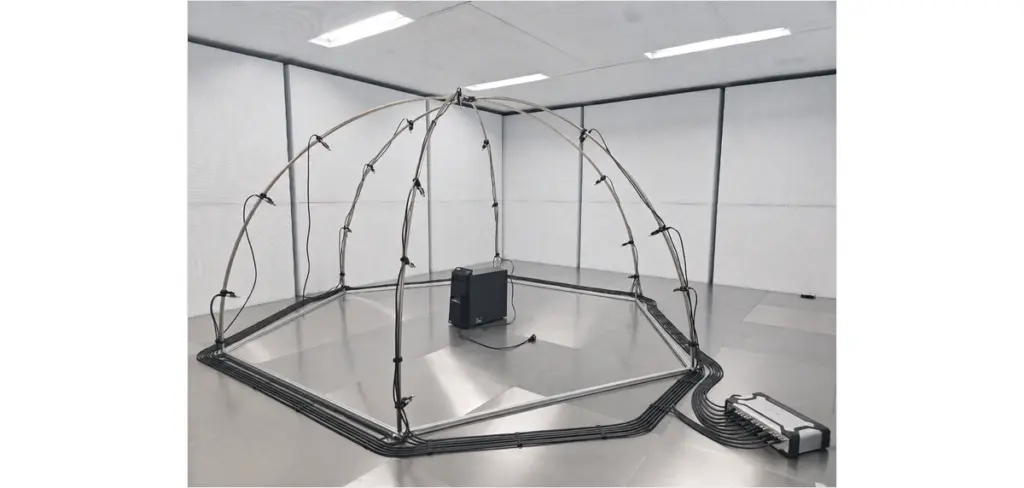
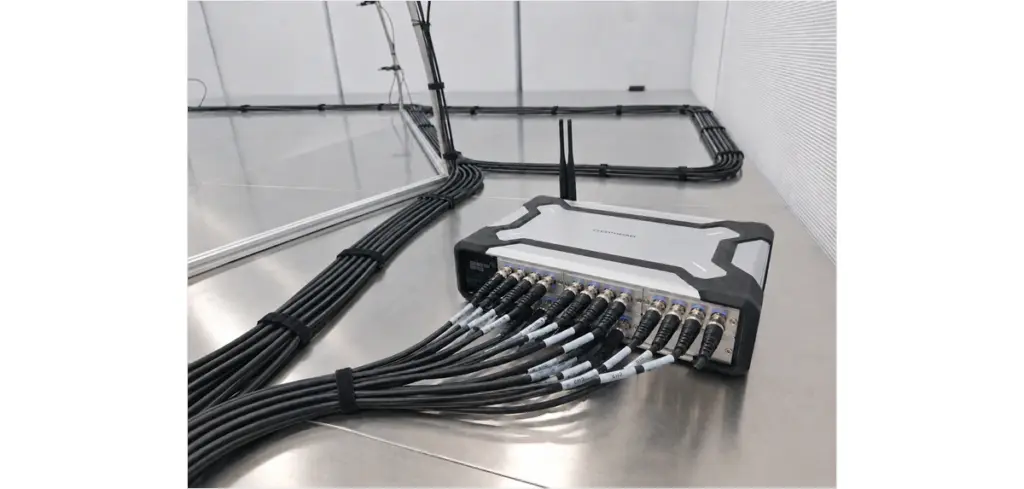
The test was carried out in a semi-anechoic chamber. Engineers placed the server at the center of the hemispherical measurement surface, with microphones installed at multiple standard measurement points on the hemispherical frame. All microphones were connected to the SonoDAQ Pro via cables, while OpenTest handled sound power measurement configuration, background noise acquisition, operating noise acquisition, and subsequent calculation.
What Actually Needs to Be Recorded Synchronously
Sound power measurement is not simply a matter of plugging in multiple microphones. To make the results reviewable, at least the following information needs to be kept together during the test:
- Measurement point position and channel number corresponding to each microphone;
- Calibration information before and after the test, as well as microphone sensitivity parameters;
- Semi-anechoic chamber environmental conditions, including temperature, humidity, air pressure, and background noise;
- Time-averaged sound pressure levels and spectrum data at each measurement point while the server operates under the specified condition;
- Background noise correction, environmental correction, and final A-weighted sound power level result.
If this information is scattered across different spreadsheets, software tools, and manual notes, errors can easily occur during report preparation. This is where multi-channel synchronous acquisition matters: all measurement points are acquired within the same time window, so test personnel do not need to repeatedly move a single microphone, and uncertainty caused by changes in the server operating condition is reduced.
From Background Noise to Sound Power Results
A complete test usually starts with background noise. When the server is not running, the system first records the environmental noise in the semi-anechoic chamber. The server is then started and brought to the specified operating condition, after which operating noise is acquired at each measurement point. OpenTest calculates the sound power level according to the selected standard and measurement surface parameters, and provides spectrum results.
For testing institutions, spectrum data is more useful than a single total value. The total sound power level can be used for reporting and judgment, while spectra help customers identify the frequency bands where noise is mainly concentrated. In server samples, for example, fan-related noise often appears more prominently in the mid-to-high frequency range or at specific narrowband positions. This information can be fed back to R&D and improvement teams.
Why Use SonoDAQ Pro and OpenTest
In this project, the role of SonoDAQ Pro is to acquire multiple microphone signals stably and synchronously. The role of OpenTest is not merely to act as a calculator, but to organize the entire testing process: selecting the method, setting the measurement surface, acquiring background noise, acquiring operating noise, viewing spectra, and exporting reports.
The benefit is straightforward. On site, test personnel can focus on sample status and measurement conditions instead of spending time on channel tables, file naming, and data transfer. For institutions such as metrology institutes, a clear workflow is more important than saving a few minutes in a single test, because it affects subsequent report review, customer explanation, and quality-system traceability.
Which Applications This Method Can Support
The test object in this case was a server, but the same workflow can be extended to home appliances, motors, fans, compressors, and small complete machines. For tasks with higher accuracy requirements, the precision method can be used under semi-anechoic chamber conditions. For routine commissioned testing and product benchmarking, the engineering method can be used. For rapid on-site evaluation or preliminary screening, the survey method can also be used.
This is exactly the type of system that testing institutions need: not a temporary setup for one specific sample, but a reusable sound power measurement method. When the sample changes, the measurement logic remains clear; when the reporting object changes, the data chain remains complete.
From Data to Judgment
Sound power measurement ultimately does not answer the question of whether the device makes sound. Instead, it answers several more engineering-oriented questions: What is the sound power level of this device? Does the result meet customer or standard requirements? In which frequency bands is the noise mainly concentrated? Does the sound power change significantly under a different operating condition?
When multi-channel sound pressure data, spectra, background noise, and report results are stored synchronously in the same system, test personnel can move more easily from data to judgment. This is the core value of this case: turning what appears to be an ordinary server noise test into a reproducible, explainable, and deliverable sound power measurement workflow.
Conclusion
For customers, the credibility of a sound power report comes from the combined support of the on-site setup, acquisition chain, calculation method, and data records. The metrology institute's test configuration connects the semi-anechoic chamber, hemispherical measurement surface, multi-channel acquisition, and software analysis, providing a more stable foundation for noise testing of servers, home appliances, motors, fans, and similar products.


