OpenTest v1.4 Beta: Multi-tone Generator, Expanded Sound Quality Metrics, Auto Mic Layout for Sound Power, and Simpler Licensing

Table of Contents

    OpenTest releases a new version every month, with the goal of ensuring that each update introduces features that truly matter to users while making the software better and faster with every release. OpenTest v1.4.0 Beta is now available, bringing updates across signal generation, hardware compatibility, new algorithms, feature improvements, and a simpler licensing experience:

    • Expanded Generator support for multi-tone, dual-tone, and waveform files
    • Expanded Sound Quality measurements with roughness, fluctuation strength, speech interference level, and speech intelligibility index
    • In the Sound Power module, the parallelepiped measurement surface now supports dynamic calculation of microphone positions based on the DUT and measurement distance
    • Dynamic monitoring of remaining storage capacity during testing, with automatic stop when available space is less than 1 GB to prevent data loss
    • Added support for the SonoDAQ ADS module
    • Added Spanish language support
    • Fully upgraded licensing system, with direct online purchase and upgrade available on the OpenTest website

    Why This Update Matters

    In acoustic and NVH testing, improving efficiency is not only about adding more algorithms. It is also about reducing the small points of friction that slow engineers down, such as limited Generator capability, data loss caused by insufficient storage, cumbersome standard-based calculations, and inconvenient license updates.

    OpenTest 1.4.0 Beta is designed to address exactly these issues.

    More Flexible Signal Generation for Real Test Conditions

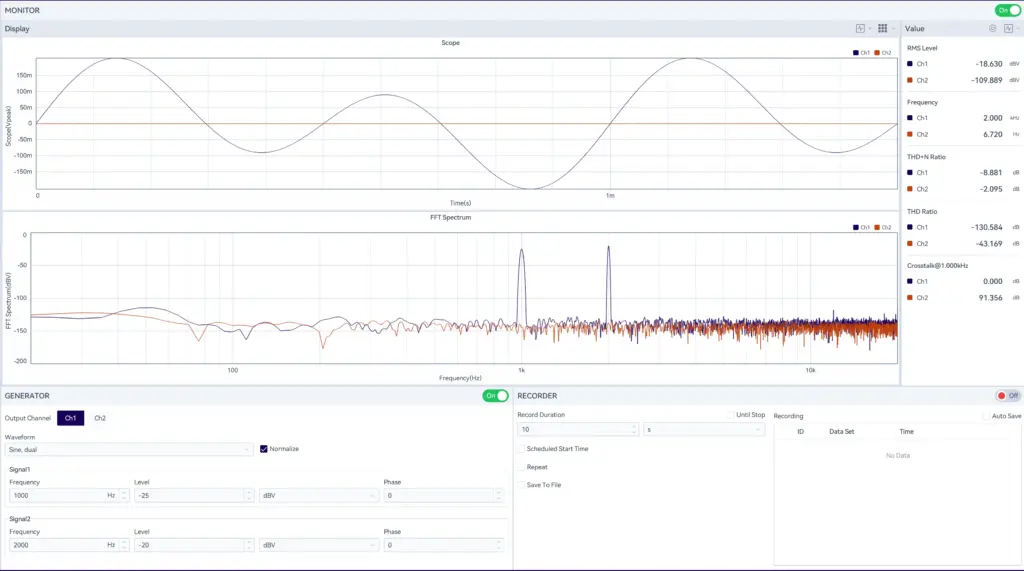
    The upgraded OpenTest Generator now supports:

    • Sine waves (single-tone, dual-tone, and multi-tone)
    • Square waves
    • Noise (white noise and pink noise)
    • Waveform file import
    Audio test software dashboard showing waveform scope, FFT spectrum, signal generator, and recorder panels
    Figure 1. Generator

    This means users are no longer limited to simple excitation. Instead, they can build test conditions that more closely reflect actual product behavior, production verification logic, or customer-specific excitation requirements.

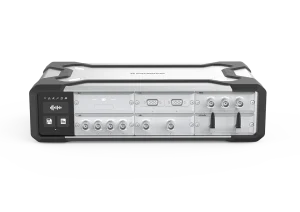
    This is especially useful for scenarios where only the Monitor & Generator functions are used for real-time analysis. In such cases, the team no longer needs an external signal generator. With only one DAQ device that supports both input and output channels, such as the CRY5820 SonoDAQ Pro, the required measurement can be completed.

    More Complete Sound Quality Analysis

    In more and more applications, "how it sounds" matters just as much as "how loud it is." For many products, two samples may have similar SPL values, yet their perceived sound quality can be completely different.

    After this upgrade, the OpenTest Sound Quality module supports simultaneous analysis of Loudness, Sharpness, Roughness, Fluctuation Strength, PR, TNR, SIL, and SII.

    These expanded sound quality analysis capabilities make the workflow more complete for engineers. They can be used to evaluate annoyance, comfort, modulation behavior, and speech-related acoustic performance. The updated module is suitable for scenarios such as automotive NVH and in-cabin sound evaluation, home appliance and HVAC noise optimization, and other applications where subjective listening impressions need to be translated into quantitative engineering metrics.
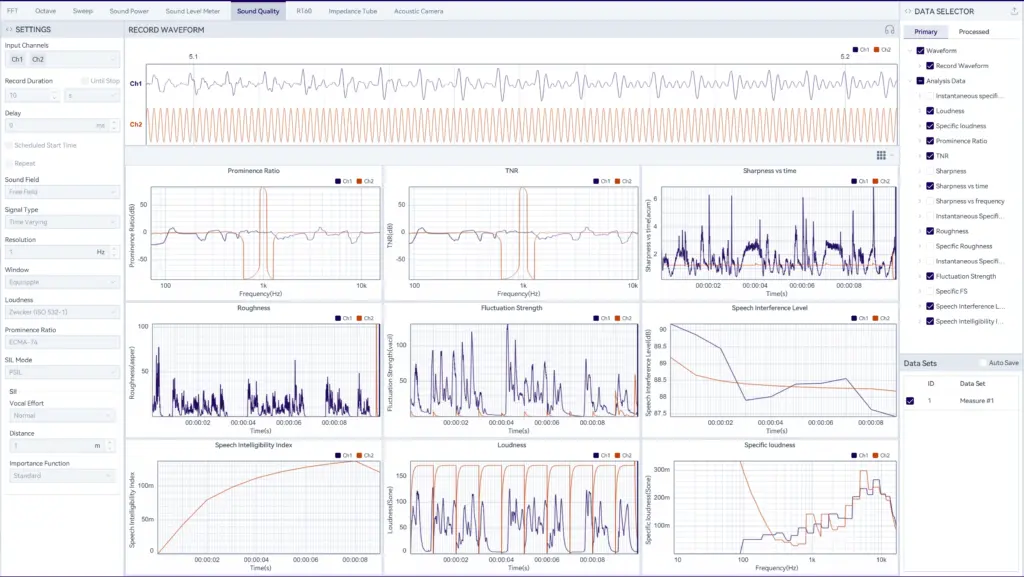
    Sound quality analysis dashboard with waveform, loudness, sharpness, roughness, and speech intelligibility charts
    Figure 2. Sound Quality Analysis

    For more information, continue reading: Sound Quality Measurement: ISO 532 Loudness & ECMA-74 Tonality Guide (Free OpenTest)

    Faster Sound Power Microphone Layout Configuration

    Sound power testing requires microphone positions to be calculated according to the standard. Different measurement surfaces, DUT sizes, and measurement distances result in different microphone layouts.

    In v1.4.0 Beta, the parallelepiped measurement surface now supports dynamic calculation of microphone positions based on DUT dimensions and the selected measurement distance.

    This improvement reduces manual calculation and setup work, helping users configure sound power tests more efficiently and consistently.
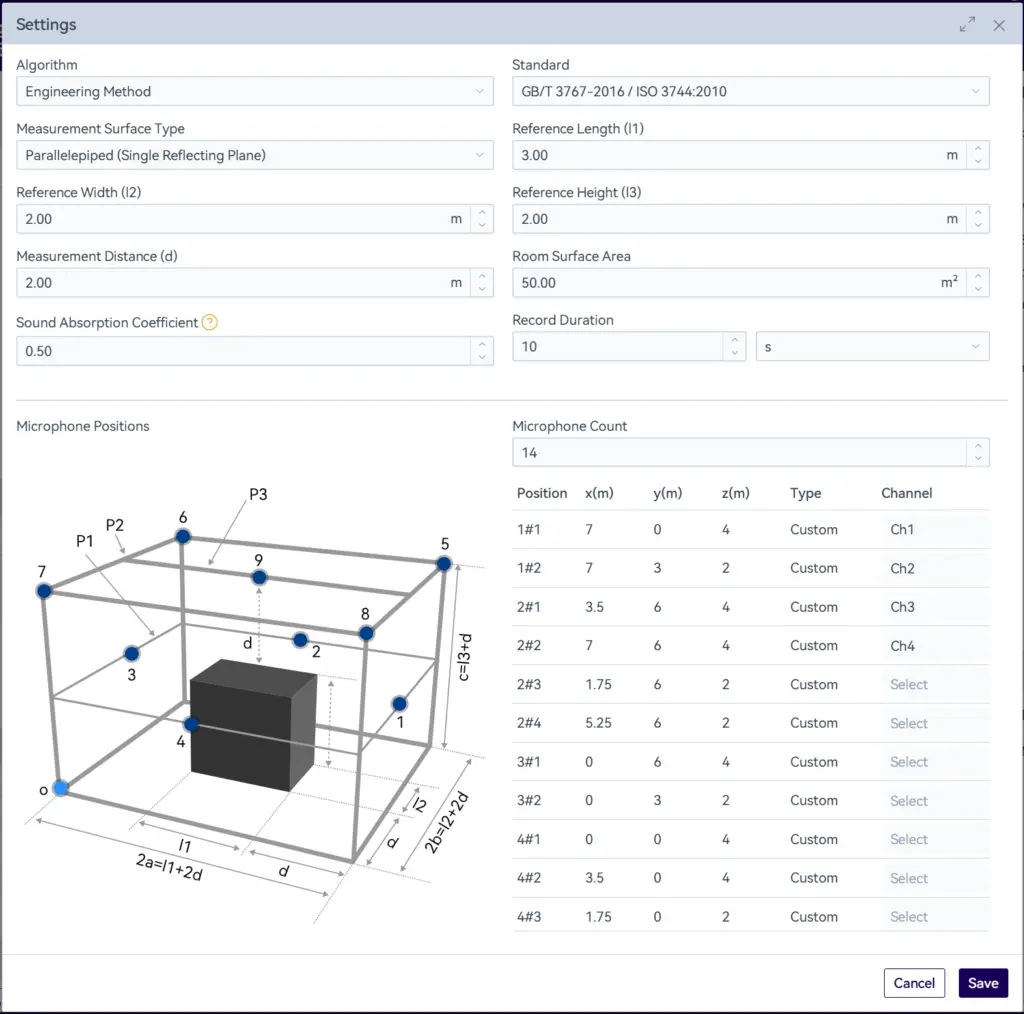
    Sound power settings panel with measurement parameters, microphone position diagram, and channel mapping table
    Figure 3. Sound Power Measurement Settings

    For laboratories that need to handle multiple DUT sizes or frequently switch test objects, this means less time spent on calculation and setup, and more time focused on the measurement itself.

    For more information, continue reading: ISO 3744 Sound Power Testing with OpenTest

    Safer Long-Duration Measurements with Dynamic Storage Protection

    Long-duration measurements are common in noise monitoring, durability studies, unattended operation, and field testing. However, they also come with a practical risk: running out of storage during acquisition.

    In v1.4.0 Beta, OpenTest dynamically monitors the remaining storage capacity during testing. When available space falls below 1 GB, recording stops automatically to prevent data loss and workflow interruption.

    This may seem like a small change, but it brings significant practical value. In the past, engineers often discovered storage failure only after a long test had already ended. Now, OpenTest provides built-in protection during acquisition itself.

    For teams that rely on overnight recording or scheduled long-duration measurements, this makes OpenTest much more dependable in real-world testing environments.

    Adapted for the SonoDAQ ADS Module

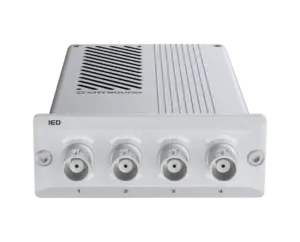
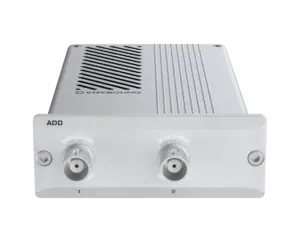
    OpenTest is now fully adapted to the SonoDAQ platform and currently supports the IED, IES, ADD, and ADS modules, delivering a high-quality user experience across the SonoDAQ ecosystem.

    As the SonoDAQ module family continues to expand, OpenTest will continue to add support for new modules, further extending platform compatibility within the CRYSOUND hardware ecosystem.

    Added Spanish Language Support

    As the platform continues to expand internationally, language accessibility matters not only for ease of use, but also for training, deployment, and adoption across distributed teams.

    The addition of Spanish is another step toward making OpenTest more practical for global users and partners.

    OpenTest now supports 8 languages:

    • Chinese
    • English
    • Russian
    • German
    • French
    • Japanese
    • Korean
    • Spanish

    A Simpler Licensing Experience with Online Trial, Upgrade, and Add-On Options

    This release also includes a comprehensive upgrade to the OpenTest licensing system.

    Users can now directly download the free version for evaluation and complete online upgrades and purchases through the OpenTest website, significantly simplifying the trial and upgrade process.

    The Community Edition serves as a free entry point, enabling users to get started with a low barrier and validate the platform's core value. The Basic and Professional Editions are offered on an annual subscription basis, designed for individual engineers and small teams that require more channels, advanced functionality, and ongoing support. The Enterprise Edition is intended for more complex needs such as white labeling, custom features, organization-wide expansion, and dedicated support. For functional add-ons such as the Sound Power add-on and the Sound Quality add-on, users can also purchase incrementally based on actual needs.

    This means the value of the licensing upgrade goes beyond simply making purchasing more convenient. More importantly, it enables users to move naturally along a path of "try first, validate, expand, and then scale deployment." It lowers the barrier to initial evaluation while making subsequent procurement, capacity expansion, and long-term adoption much smoother.
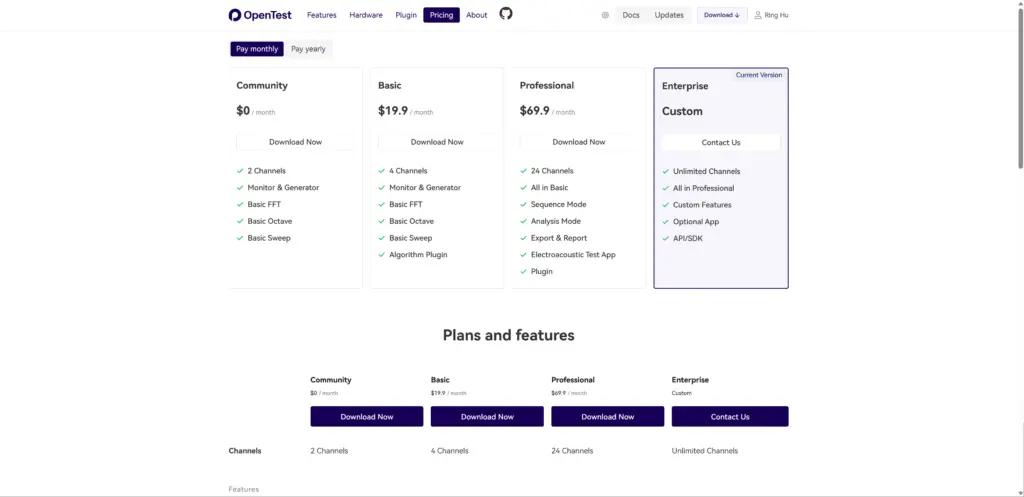
    OpenTest pricing page showing Community, Basic, Professional, and Enterprise software plans
    Figure 4. Opentest Pricing Plicing Plans Software Subscription Page

    Get Started with OpenTest

    OpenTest 1.4.0 Beta is now available. You can download the client from the OpenTest website and start using it for free.

    If you are already using OpenTest, this update will bring a more complete and robust experience for sound quality analysis, signal generation, long-duration recording, and sound power testing.

    If you are evaluating new software for acoustic and NVH testing, OpenTest 1.4.0 Beta is a great opportunity to see how OpenTest can help you work more efficiently from acquisition to analysis and reporting.

    To learn more, upgrade your plan, or further explore OpenTest, please visit the OpenTest website or contact the CRYSOUND team at info@crysound.com.

    sound power

    ISO 3744 Sound Power Testing with OpenTest

    Under regulations such as the EU Machinery Noise Directive, more and more products—from toys and power tools to IT equipment—are required to declare their sound power level on labels and in documentation, rather than simply claiming they are “quiet enough.” For typical office devices like notebook computers, idle noise is often around 30 dB(A), while full-load operation can approach 40 dB(A). These figures are usually obtained from sound power measurements performed in accordance with ISO 3744 and related standards. Sound Pressure vs. Sound Power A noise source emits sound power, while what we measure with a microphone is sound pressure. Sound pressure varies with room size, reverberation, and microphone distance, whereas sound power is the source’s own “noise energy” and does not change with installation or environment. That makes sound power a better metric for external product noise specification. In simple terms: Sound power is the cause – the energy emitted by the source (unit: W / dB); Sound pressure is the effect – the sound pressure level we hear and measure (unit: Pa / dB). ISO 3744 defines how to do this in an “essentially free field over a reflecting plane”: arrange microphones around the source on an enveloping measurement surface, measure the sound pressure levels on that surface, then apply specified corrections and calculations to obtain stable, comparable sound power levels. Device Under Test: An Everyday Notebook Computer Assume our DUT is a 17-inch office notebook. The goal is to determine its A-weighted sound power level under different operating conditions (idle, office load, full load), in order to: Compare different cooling designs and fan control strategies; Provide standardized data for product documentation or compliance; Supply baseline data for sound quality engineering (for example, whether the fan noise is annoying). The test environment is a semi-anechoic room with a reflecting floor. The notebook is placed on the reflective plane, and multiple microphone positions are arranged around it (using a hemispherical frame or a regular grid). Overall, the setup satisfies ISO 3744 requirements for the measurement surface and environment. Measurement System: SonoDAQ Pro + OpenTest Sound Power Module On the hardware side, we use SonoDAQ Pro together with measurement microphones, arranged around the notebook according to the standard. OpenTest connects to SonoDAQ via the openDAQ protocol. In the channel setup interface, you select the channels to be used and configure parameters such as sensitivity and sampling rate. From Standard to Platform: Why Use OpenTest for Sound Power? OpenTest is CRYSOUND’s next-generation platform for acoustic and vibration testing. It supports three modes—Measure, Analysis, and Sequence—covering both R&D laboratories and repetitive production testing. For sound power applications, OpenTest implements a sound-pressure-based solution fully compliant with ISO 3744 (engineering method), and also covering ISO 3745 (precision method) and ISO 3746 (survey method). You can flexibly select the test grade according to the test environment and accuracy requirements. The platform includes dedicated sound power report templates that generate standards-compliant reports directly, avoiding repeated manual work in Excel. On the hardware side, OpenTest connects to multi-brand DAQ devices via openDAQ, ASIO, WASAPI, and NI-DAQmx, enabling unified management of CRYSOUND SonoDAQ, RME, NI and other systems. From a few channels for verification to large microphone arrays, everything can be handled within a single software platform. Three Steps: Running a Standardized ISO 3744 Sound Power Workflow Step 1: Parameter Setup and Environment Preparation After creating a new project in OpenTest: In the channel setup view, select the microphone channels to be used and configure sensitivity, sampling rate, frequency weighting, and other parameters. Switch to Measure > Sound Power and set the measurement parameters: Test method and measurement-surface-related parameters; Microphone position layout; Measurement time; Other parameters corresponding to ISO 3744. This step effectively turns the standard’s clauses into a reusable OpenTest scenario template. Step 2: Measure Background Noise First, Then Operating Noise According to ISO 3744, you must measure sound pressure levels on the same measurement surface with the device switched off and device running, in order to perform background noise corrections. In OpenTest, this is implemented as two clear operations: Acquire background noiseClick the background-noise acquisition icon in the toolbar. OpenTest records ambient noise for the preset duration.In the survey method, OpenTest updates LAeq for each channel once per second;In the engineering and precision methods, it updates the LAeq of each 1/3-octave band once per second. Acquire operating noiseAfter background acquisition, click the Test icon. OpenTest will:a. Record notebook operating noise for the preset duration;b. Update real-time sound pressure levels once per second;c. Automatically store the run as a data set for later replay and comparison. Step 3: From Multiple Measurements to One Standardized Report After completing multiple operating conditions (for example: idle, typical office work, full-load stress): In the data set view, select the records you want to compare and overlay them to observe sound power differences under different conditions; In the Data Selector, click the save icon to export the corresponding waveform files and CSV data tables for further processing or archiving; Click Report in the toolbar, fill in project and device information, select the data sets to include, adjust charts and tables, and export an Excel report with one click. The report includes measurement conditions, measurement surface, band or A-weighted sound power levels, background corrections, and other key information. It can be used directly for internal review or regulatory/customer submissions, following the same idea as other standardized sound power reporting solutions. From a Single Notebook Test to a Reusable Sound Power Platform Running an ISO 3744 sound power test on a notebook is just one example. More importantly: The standardized OpenTest scenario can be cloned for printers, home appliances, power tools, and many other products; Multi-channel microphone arrays and SonoDAQ hardware can be reused across projects within the same platform; The test workflow and report format are “locked in” by the software, making it easier to hand over, review, and audit across teams. If you are building or upgrading sound power testing capability, consider using ISO 3744 as the backbone and OpenTest as the platform that links environment, acquisition, analysis, and reporting into a repeatable chain—so each test is clearly traceable and more easily transformed from a one-off experiment into a lasting engineering asset. Visit www.opentest.com to learn more about OpenTest features and hardware solutions, or contact the CRYSOUND team by filling out the “Get in touch” form below.
    Sound Quality

    Sound Quality Measurement: ISO 532 Loudness & ECMA-74 Tonality Guide (Free OpenTest)

    Learn how to measure Loudness (ISO 532-1), Sharpness, and Tonality (ECMA-74) with OpenTest — free, open-source software. Step-by-step guide for automotive NVH, consumer electronics & home appliances engineers. This article is for engineers working in acoustics and vibration testing. It introduces how to perform sound quality measurements in OpenTest based on the ISO 532 loudness standard and the ECMA-74 tonality evaluation methods. By measuring and comparing three key psychoacoustic metrics — Loudness, Sharpness, and Prominence (Tonality) — teams in consumer electronics, automotive NVH, home appliances and IT equipment can turn “how good or bad it sounds” into quantitative engineering data, and complete a standardized sound quality workflow on a single platform from data acquisition, through analysis, to reporting. Why Sound Quality Measurements Matter In traditional noise testing, we usually rely on dB values to describe how “loud” a device is. But more and more studies and real-world projects are reminding engineers that “loudness” is only part of the story. In automotive NVH, home appliances, IT equipment and consumer electronics, user acceptance of product sound depends much more on whether it sounds pleasant, sharp, tiring or annoying, not just the overall sound pressure level. Industry surveys also show that most manufacturers now treat “how good it sounds” as being just as important as “how quiet it is”, and they start paying attention to sound quality already in early design phases. At the same sound level, poor sound quality can significantly drag down overall product satisfaction. This is exactly why Sound Quality as a discipline exists: through a set of psychoacoustic metrics such as Loudness, Sharpness and Tonality/Prominence, it turns subjective impressions like “sharp”, “boomy”, “harsh” or “smooth” into data that is measurable, comparable and traceable, so engineering teams can go beyond noise control and truly design and optimize product sound around listening experience. Key Metrics in Sound Quality Measurement In engineering practice, sound quality is not a single number, but a set of psychoacoustic quantities. Commonly used metrics include Loudness, Sharpness, Roughness, Fluctuation Strength, Prominence/Tonality, etc. Figure 1 – Key metrics in sound quality measurement Loudness (ISO 532-1) Loudness and Loudness Level describe how loud a sound is perceived by the human ear, rather than just its sound pressure level in dB. Internationally, the ISO 532-1:2017 standard based on the Zwicker method is widely used for loudness calculation. It can handle both stationary and time-varying sounds and correlates well with subjective perception in many technical noise applications. From an engineering point of view, loudness has clear advantages over A-weighted SPL: It accounts for the ear’s different sensitivity to frequency (human hearing is more sensitive in the mid-high range) At the same dB level, loudness often tracks “does it feel loud or not?” more accurately Sharpness (DIN 45692) Sharpness reflects whether a sound is perceived as sharp or piercing. When the high-frequency content has a higher proportion, people tend to feel the sound is more “sharp” or “edgy”. Sharpness was standardized in DIN 45692:2009, and is typically calculated based on the specific loudness distribution from a loudness model, applying additional weighting in the higher Bark bands. The result is expressed in acum. In applications such as fans, compressors and e-drive whine, reducing sharpness often improves subjective comfort more effectively than just lowering the overall dB level. Roughness (asper) Roughness corresponds roughly to fast amplitude modulation in the 15–300 Hz range, which gives a “raspy, vibrating” impression — for example in certain inverter whines or gear whine where the sound feels like it is “shaking”. Unit: asper Classical definition: 1 asper corresponds to a 1 kHz, 60 dB pure tone amplitude-modulated at about 70 Hz with 100% modulation depth The deeper the modulation and the closer the modulation frequency is to the sensitive region (around 70 Hz), the higher the perceived roughness In engineering, roughness is often used to describe how much a sound feels like it is “buzzing” or “scratching”, and it is particularly relevant for subjective evaluation of technical noise in e-drive systems, gearboxes and compressors. Fluctuation Strength (vacil) Fluctuation Strength captures slower amplitude fluctuations — amplitudes that go up and down in the range of roughly 0.5–20 Hz, perceived as “pulsing” or “breathing”, with a typical peak sensitivity around 4 Hz. Unit: vacil A classical definition of 1 vacil: a 1 kHz, 60 dB pure tone with 4 Hz, 100% amplitude modulation In cabin idle “breathing noise”, or fans whose level periodically rises and falls, fluctuation strength is a key descriptor You can think of Fluctuation Strength and Roughness as two sides of the same “modulation” coin: Fluctuation Strength: slow modulation (a few Hz), perceived as “breathing” or “pulsing” Roughness: faster modulation (tens of Hz), perceived as “vibrating, raspy, grainy” Prominence / Tonality (ECMA-74) Many devices are not particularly loud overall, yet become extremely annoying because of one or two narrowband tonal components. These “sticking out tones” are usually quantified by Tonality / Prominence. In IT and information technology equipment noise, ECMA-74 specifies methods based on Tone-to-Noise Ratio (TNR) and Prominence Ratio (PR) to evaluate tonal prominence and to determine whether a spectral line is a “prominent tone”. Historically, these metrics come from psychoacoustic research and are now widely used in automotive, aerospace, home appliances and IT equipment to predict and optimize annoyance. For example, studies have shown that, with loudness controlled, Sharpness, Tonality and Fluctuation Strength are important predictors for the annoyance of helicopter noise. Why Sound Quality Is More Useful Than Just “Watching dB” In many projects, you may have already seen questions like these: Two fan designs have similar sound power levels, but one “sounds smooth” while the other has a clear whine After noise reduction, overall SPL is a few dB lower, but user feedback hardly improves On the production line, A-weighted SPL is used as the only criterion, and some “bad-sounding” units still slip through Fundamentally, that is because: Sound pressure level / sound power = “how much energy is there” Sound quality metrics = “how the ear feels about it” With metrics like Loudness, Sharpness, Roughness, Fluctuation Strength and Prominence, you can decompose vague complaints like “it just sounds uncomfortable” into: Which frequency region has too much energy (leading to high sharpness) Whether there is strong amplitude modulation (causing high roughness or fluctuation strength) Whether any tonal component is sticking out clearly above its surroundings (high tonality / prominence) In engineering iteration, these metrics can be mapped directly to: Structural optimization (stiffness, modes, blade shape, etc.) Control strategies (e.g. PWM frequency, fan speed curves and transitions) Material and noise treatment / isolation choices This gives you much clearer and more actionable directions than “just reduce dB”. Sound Quality Analysis in OpenTest As a platform for acoustics and vibration testing, OpenTest supports a complete sound quality workflow from acquisition → analysis → reporting. Fill in the form at the bottom ↓ of this page to contact us and get an OpenTest demo. Example Device: Office PC Fan Noise To make the process concrete, we use a very accessible device as our example: a typical office PC. Test objective: evaluate sound quality metrics of its fan noise under different operating conditions, in order to: Compare subjective noise performance of different cooling and fan control strategies Provide quantitative input to NVH reviews (e.g. does loudness exceed the target, is sharpness too high?) Build a foundation for further sound quality optimization (e.g. suppressing whine frequencies, smoothing speed transitions) Test environments might be: A semi-anechoic room / low-noise lab (recommended); or A quiet office environment for early-stage, comparative evaluation Measurement System: SonoDAQ + OpenTest Sound Quality Module On the hardware side, we use a CRYSOUND SonoDAQ multi-channel data acquisition system (for more detailed model information, please contact us), together with one or more measurement microphones placed near the PC fan or at the listening position, according to the test requirements. Figure 2 – SonoDAQ Pro multi-channel data acquisition system Of course, OpenTest also supports connection via openDAQ, ASIO, WASAPI and other mainstream audio interfaces, so you can reuse existing DAQ devices or audio interfaces for measurement where appropriate. On the software side, the Sound Quality module in OpenTest is one of the measurement modules. Combined with FFT analysis, octave analysis and sound level analysis, it can cover most standard audio and vibration test needs. Configuring Measurement Parameters After creating a new project in OpenTest, proceed as follows: 1. Channel configuration and calibration In Channel Setup, select the microphone channels to be used and set sensitivity, sampling rate and frequency weighting as required Use a sound calibrator (e.g. 1 kHz, 94 dB SPL) to calibrate the measurement microphones, ensuring that loudness and related metrics have a reliable absolute reference 2. Switch to the “Measure > Sound Quality” module Select the metrics to be calculated: Loudness, Sharpness, Prominence Set analysis bandwidth, frequency resolution and time averaging modes Optionally configure test duration and labels for different operating conditions Essentially, this step turns the “calculation definitions” in ISO 532, DIN 45692 and ECMA-74 into a reusable OpenTest sound quality scenario template. Acquiring Sound Data for Different Operating Conditions Once the test environment is set up and the parameters are configured, click Start to measure sound quality data under different operating conditions. Each test record is saved automatically for later analysis. Because sound quality focuses on how it sounds during real use, it is recommended to record several typical conditions, for example: Idle / standby (fan off or low speed) Typical office load (documents, multi-tab browsing, etc.) High load / stress test (CPU/GPU at full load) With this breakdown, engineers can clearly manage which sound quality result corresponds to which operating condition. Figure 3 – Overlaying multiple sound quality test records in OpenTest From Multiple Measurements to One Sound Quality Report After measuring multiple operating conditions (e.g. idle, typical office and full-load stress test), you can do the following in OpenTest. In the data set list, select the records you want to compare and overlay: Compare loudness curves under different conditions See whether sharpness spikes during acceleration or speed transitions Identify conditions where prominent narrowband tones appear (high prominence) In the Data Selector, save the associated waveforms and analysis results: Export .wav files for later listening tests or subjective evaluations Export .csv / Excel for further statistics or modelling Click the Report button in the toolbar: Enter project, DUT and operating condition information Select sound quality metrics and plots to include (e.g. loudness vs. time, bar charts of sharpness, spectra with marked tonal prominence) Generate a sound quality report with one click for internal review or customer submission Figure 4 – Example of a sound quality report in OpenTest The generated report includes measurement conditions and operating modes, key sound quality metrics such as Loudness, Sharpness and Prominence, as well as a comparison with traditional acoustic metrics (sound pressure level, 1/3-octave spectra, sound power, etc.), making it easier for project teams to discuss using a set of metrics that are both objective and closely related to perceived sound. Typical Application Scenarios You can build different sound quality test scenarios in OpenTest for different businesses, for example: Consumer electronics / IT equipment (laptops, routers, fans, etc.) Use loudness + sharpness + (where applicable) roughness to evaluate the “subjective comfort” of different thermal / fan strategies Compare sound quality across different speed curves or PWM schemes Automotive NVH / e-drive systems Use multi-channel acquisition to record interior noise and speed signals synchronously Combine order analysis with sound quality metrics to see how “sharp” an e-drive whine is and whether there is pronounced modulation causing roughness Home appliances and industrial equipment When sound power already meets standards, use sound quality metrics to further screen for “annoying noise”, instead of relying only on dB If you are building or upgrading your sound quality testing capabilities, you can use ISO 532 and ECMA-74 as the backbone and let OpenTest connect environment, acquisition, analysis and reporting into a repeatable chain. That way, each sound quality test is clearly traceable and much more likely to evolve from a single experiment into a long-term engineering asset. Welcome to fill in the form below ↓ to contact us and book a demo and trial of the OpenTest Sound Quality module. You can also visit the OpenTest website at www.opentest.com to learn more about its features and application cases.

    Get in touch

    If you are interested or have questions about our products, book a demo and we will be glad to show how it works, which solutions it can take part of and discuss how it might fit your needs and organization.

    Support Support
    Product Catalogs Product Catalogs Solutions Solutions User Manuals User Manuals Software Download Software Download Product Inquiry Product Inquiry Schedule Demo Schedule Demo Technical Support Technical Support +86-571-88225128 +86-571-88225128
    Request Quote 0
    Request Quote