Floating Partial Discharge in MV Switchgear: Detection and Repair Case Study

Table of Contents

    Partial discharge (PD) signals were detected in the medium-voltage switchgear of a plant, raising concerns about the safety and stability of the electrical system. To ensure safe inspection, the technical team isolated the affected area by cutting power.

    Corrective measures included applying high voltage from an external source to the equipment and using advanced detection tools to accurately identify the location and root cause of the discharge.

    During the investigation, two main methods were employed to detect and analyze PD signals:

    • Ultrasound
    • Transient Earth Voltage (TEV)

    Detection and Diagnosis

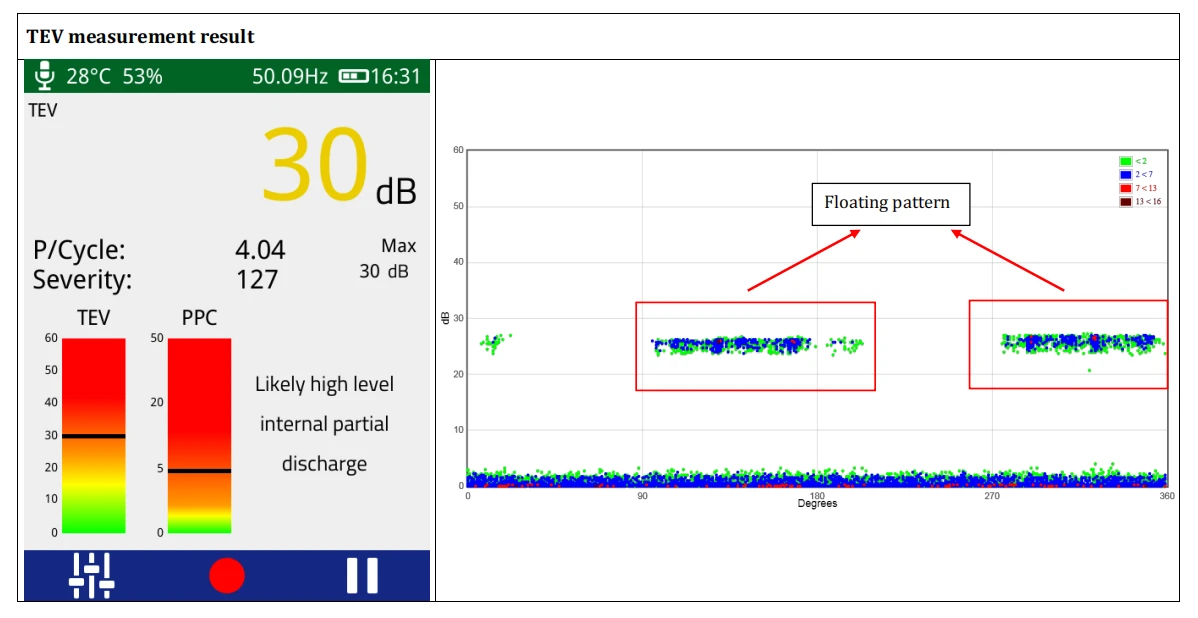
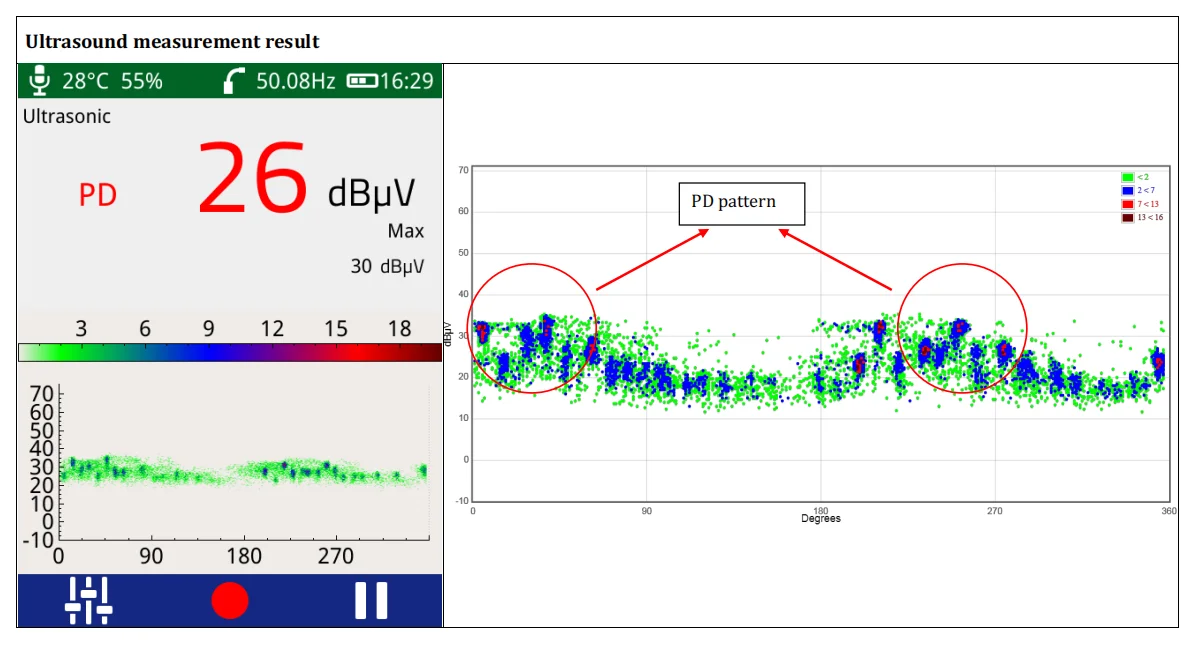
    Floating Partial Discharge (PD) signals were detected at the medium-voltage switchgear panels of a plant using EA UltraTEV Plus² with Ultrasound and Transient Earth Voltage (TEV) methods. However, the exact location of the PD could not be determined.

    TEV measurement showing a 30 dB floating pattern in MV switchgear, indicating likely internal partial discharge.

    Figure 1. TEV measurement showing a 30 dB floating pattern in MV switchgear, indicating likely internal partial discharge.

    Ultrasound measurement showing a 26 dBμV PD pattern in MV switchgear with clustered discharge activity.

    Figure 2. Ultrasound measurement showing a 26 dBμV PD pattern in MV switchgear with clustered discharge activity.

    Pinpointing the Source with CRY2623

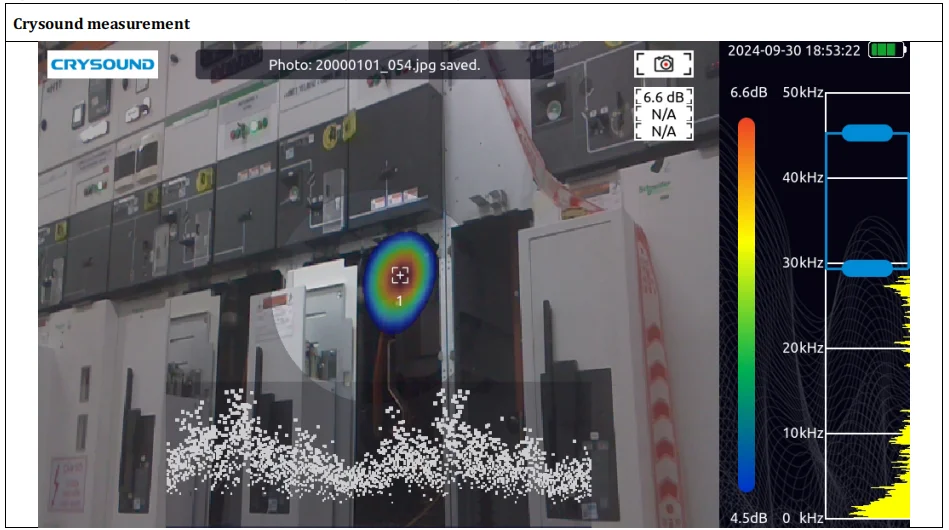
    To further investigate, high voltage from an external source was applied to the circuit breaker within the open switchgear panel. The CRYSOUND CRY2623 device - capable of recording partial discharge signals in the form of images, sound, and diagrams - was then used to visually and accurately identify the precise source of the discharge signals. As a result, the plant's power outage time was significantly reduced.

    CRY2623 acoustic imaging locating floating PD at the upper pole field deflector of the circuit breaker.

    Figure 3. CRY2623 acoustic imaging locating floating PD at the upper pole field deflector of the circuit breaker.

    Root Cause Identified

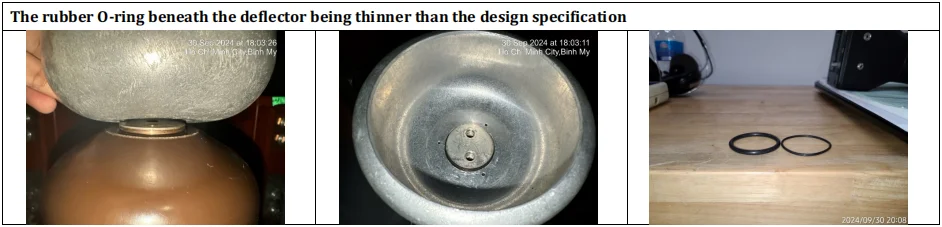
    The source of PD signal was identified at the field deflectors of the upper pole of the circuit breaker. Upon inspection, it was discovered that the field deflector was loose and showed signs of no contact with the busbar, due to the rubber O-ring beneath the deflector being thinner than the design specification.

    Inspection showing the thin O-ring beneath the field deflector, identified as the root cause of floating PD.

    Figure 4. Inspection showing the thin O-ring beneath the field deflector, identified as the root cause of floating PD.

    Verification After Repair

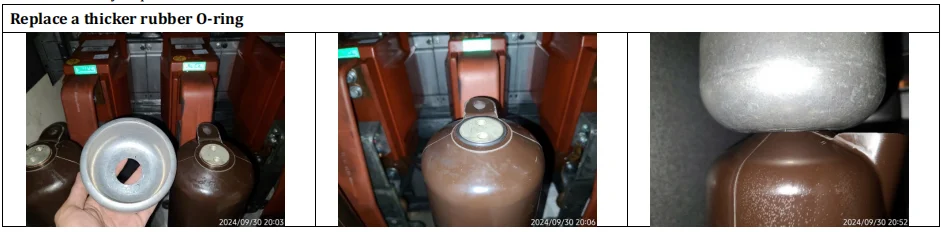
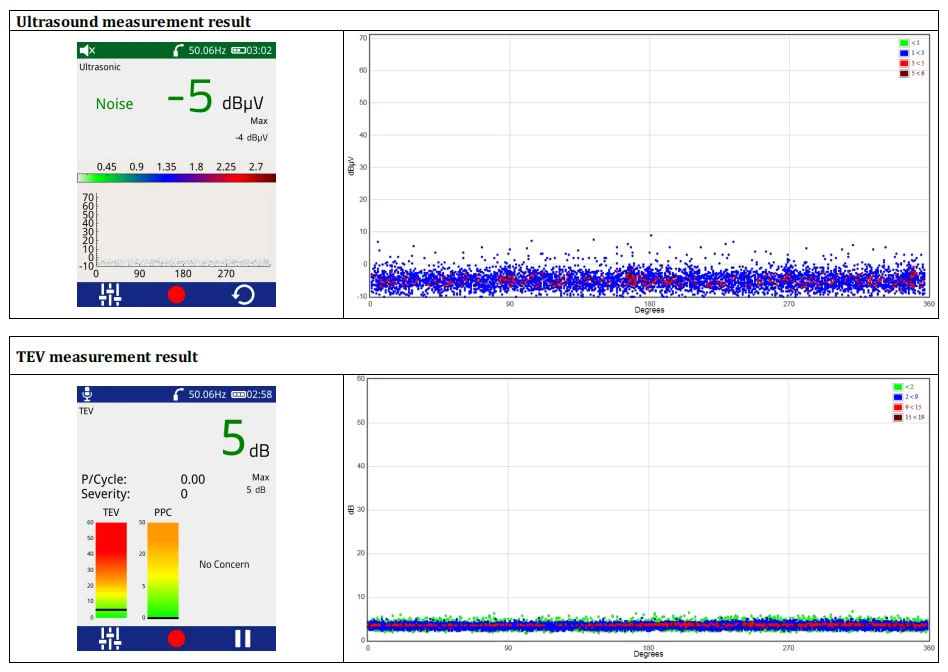
    A thicker rubber O-ring was installed as a replacement. After re-energizing the equipment, the partial discharge (PD) signal was rechecked to verify improvement.

    Repair showing replacement with a thicker O-ring beneath the field deflector to correct floating PD.

    Figure 5. Repair showing replacement with a thicker O-ring beneath the field deflector to correct floating PD.

    Post-repair ultrasound and TEV results showing noise-level ultrasound and 5 dB TEV with no concern.

    Figure 6. Post-repair ultrasound and TEV results showing noise-level ultrasound and 5 dB TEV with no concern.

    The CRYSOUND CRY2623 acoustic imaging camera enables engineers to accurately localize partial discharge sources in real time - reducing diagnostic time, minimizing unplanned downtime, and keeping your electrical systems running safely. Whether you're dealing with switchgear, transformers, or cables, the CRY2623 delivers fast, reliable fault detection so you can act before small issues become costly failures.

    Interested in learning more? Fill in the Get in touch form below and our team will get back to you shortly.

    About the Author

    PSTS logo PSTS (Vietnam) - PSTS is a trusted partner providing industrial maintenance equipment (online and offline) and advanced CBM solutions to enhance customer asset safety and reliability throughout their life cycle.
    Website: https://psts.co

    Compressed air leaks visualized in an industrial plant using a tablet-style acoustic imaging camera

    How Much Are Air Leaks Costing Your Plant? (Use Our Free Calculator)

    By Bowen · Application Engineer at CRYSOUND Compressed air leaks rarely announce themselves as a major failure. More often, they sit in the background: a hiss at a fitting, a loss point on an overhead run, a manifold that never seems quite stable, a line that stays pressurized when it does not need to. Small individually. Expensive in aggregate. That is why leaks are easy to underestimate. They do not always stop production, but they do keep drawing power and eroding usable system capacity day after day. The U.S. Department of Energy and ENERGY STAR both note that leaks can account for roughly 20% to 30% of compressed air system output in a typical plant, and ENERGY STAR adds that poorly maintained systems may lose 20% to 50% of their compressed air to leaks. A compressed air leak cost calculator can help quantify that burden. Once losses reach that range, the issue is no longer housekeeping. It is an operating-cost problem and a maintenance-priority problem. Why air leaks cost more than they look Air leaks cost more than they look because they consume both electricity and capacity. The obvious loss is energy: compressors are producing air the plant never uses. The less obvious loss is system headroom. When enough air escapes through avoidable leaks, the plant may start seeing pressure instability, slower recovery after peak demand, or equipment that feels short of air even though compressor capacity on paper should be adequate. That is why leaks often surface as symptoms before they are treated as root causes. Teams may notice unstable downstream pressure, poor actuator response, longer recovery time, or compressors that seem to be working harder than expected. The first reaction is often to adjust pressure setpoints, add capacity, or tune controls. Sometimes the simpler truth is that too much air is leaving the system before it ever reaches productive use. Compressed air leak cost: the yearly operating cost associated with compressed air that your system generates, but your plant never uses because it escapes through avoidable leaks. ENERGY STAR draws a useful contrast here. In a plant with an active leak program, losses may be kept below 10%. In a poorly maintained system, the leak share can be far higher. That gap turns leaks from background noise into a measurable operating expense. Where compressed air leaks usually hide in real plants In most plants, compressed air does not disappear through one spectacular failure. It leaks away through ordinary connection points that are easy to ignore because each one looks minor on its own. Typical leak locations include: quick-connect fittings and couplings hoses and hose-end connections threaded joints FRL assemblies and valve manifolds drains, traps, and condensate components aging seals in cylinders or actuators idle machines that stay pressurized when they do not need to be overhead distribution lines that are physically hard to inspect Some of these are simple bench-level fixes. Others are difficult mainly because of access and visibility. Overhead piping, dense manifolds, crowded mechanical spaces, and background noise all make it harder to localize the exact point of loss quickly. That is one reason leak programs stall even when everybody agrees the system probably has leaks. Why teams know leaks exist but still struggle to fix them Most plants do not lack awareness. They lack a repeatable path from suspicion to action. There are several reasons for that: the leak burden is spread across many assets rather than one dramatic failure background plant noise makes traditional listening unreliable overhead or crowded geometry slows inspection maintenance teams are asked to prioritize problems that look more urgent leadership may not see a clear financial case for dedicating time to a leak campaign Leak programs often fail at the handoff between engineering intuition and operational prioritization. The maintenance team may know leaks are present. The plant may even hear them. But if nobody can frame the cost clearly enough to justify time, and nobody can localize the leaks efficiently enough to repair them, the issue stays on the backlog. A calculator helps with the first half of that problem. It does not solve the leak. It tells the plant whether the leak problem is large enough to deserve immediate attention. Use our free calculator to estimate the business impact This article includes a lightweight compressed air leak cost calculator for that decision point. It is meant to answer one practical planning question: If our leak burden is in a realistic range, what could it be costing us per year? It supports two simple input paths: Estimate from compressor data if you know installed power, electricity cost, and runtime assumptions Use annual electricity cost if you already know the approximate yearly electricity spend for your compressed air system Compressed Air ROI How much are air leaks costing your plant? Estimate the annual cost of compressed air leaks in less than a minute. Switch between a compressor-data estimate and a direct electricity-cost shortcut. Typical planning assumption 20% Estimated leak loss rate Use the leak-loss slider to model your plant. The calculator updates live so you can stress-test different assumptions before planning repairs. Estimate from compressor data Use annual electricity cost Input assumptions Use the path that best matches what you already know about your compressed air system. Currency Affects result formatting only USD ($) EUR (€) GBP (£) CNY (¥) Total installed compressor power HP kW Electricity cost per kWh Repair budget (optional) Operating days per week Operating hours per day Annual non-production days Currency Match your annual electricity cost input USD ($) EUR (€) GBP (£) CNY (¥) Annual compressed air electricity cost Repair budget (optional) Estimated annual cost of air leaks $0 Adjust the inputs to see how compressed air leaks can turn into recurring annual spend. Annual air-system electricity cost $0 Average monthly leak cost $0 Average daily leak cost $0 Estimated payback period — Planning estimate only. This calculator helps you frame the possible business impact of compressed air leaks. It does not replace a plant energy audit or a quantified leak survey. Want to find the leaks behind this cost? Acoustic imaging helps maintenance teams see compressed air leaks faster on manifolds, fittings, and overhead lines. See acoustic leak detection solutions Assumption note: leak-loss percentage is user-defined so teams can model conservative or aggressive scenarios. The key input is the estimated leak-loss rate. That percentage is intentionally scenario-based because plants start from very different conditions. A well-managed system may justify a lower case. A site with legacy piping, recurring fitting changes, idle assets left pressurized, and no regular survey routine may justify a higher one. Use the output for planning, not for forensic accounting. Its job is to convert a suspected problem into an estimated annual exposure that can support budgeting, prioritization, and a decision on whether a leak survey should move up the queue. Why finding the leak matters more than estimating it A cost estimate is only useful if it changes field behavior. Once a plant sees that leaks may be costing thousands or tens of thousands of dollars per year, the real operational question becomes: Can we find the leaks fast enough to repair them without turning the program into a slow manual hunt? This is where many leak initiatives bog down. Estimating cost is relatively easy compared with localizing leaks across real plant geometry. A few leaks near eye level may be obvious. A larger system with overhead runs, crowded manifolds, complex drops, and tight mechanical spaces is harder. Knowing that leaks exist is not the same as being able to repair them efficiently. Execution quality depends on localization speed. If finding leaks is painfully slow, even a strong energy-saving case can lose momentum. If localization is fast and repeatable, the plant can move much more confidently from estimate to inspection to repair. How acoustic imaging helps maintenance teams localize leaks faster DOE and ENERGY STAR guidance often point maintenance teams toward ultrasonic leak detection because escaping compressed air produces high-frequency sound that is easier to detect ultrasonically than by ear in a noisy environment. That is the right starting point. In the field, though, the hard part is often not detecting that sound. It is locating the exact source quickly on a live plant floor. Acoustic imaging helps by turning that signal into a visual map. Instead of relying only on point-by-point audio cues, the inspector can see where sound energy is concentrated on top of the live scene. On dense manifolds, fittings, hose assemblies, overhead lines, and hard-to-reach drops, that visual layer can make leak localization faster and easier to document. That is especially useful when: the suspected leak zone contains many possible connection points the leak is above eye level or across a congested mechanical area the team needs to document findings for a maintenance backlog multiple leaks must be ranked and repaired efficiently If you want a fundamentals refresher on the method itself, CRYSOUND already explains the basics in What Is an Acoustic Camera? and How Acoustic Imaging Works. Some acoustic imaging workflows also support leak-severity assessment, which matters when a plant is trying to prioritize repairs instead of treating every leak as equal. For plants doing regular compressed-air inspections, CRYSOUND's handheld lineup fits that workflow directly: the CRY8124 Advanced Acoustic Imaging Camera provides a higher-resolution handheld option with 200 microphones and a 2-100 kHz frequency range, while the CRY2623 128-Mic Industrial Acoustic Imaging Camera offers 128 microphones, a 2-48 kHz frequency range, and support for gas/vacuum leak detection and leak rating in a rugged industrial format. Plants do not buy inspection tools because leak math is interesting. They buy them because once the cost is visible, they need a practical way to find and fix the leaks behind the number. A practical workflow: estimate → inspect → repair → verify Once the plant accepts that leaks are carrying real cost, the next steps do not need to be complicated. Estimate the exposure. Use the calculator to test low, mid, and high leak-loss scenarios and decide whether the annual burden justifies focused action. Inspect the likely problem zones. Start with compressors, dryers, headers, manifolds, drops, hoses, valve packs, and idle equipment that stays pressurized. Repair the most valuable leaks first. Rank issues by probable severity, accessibility, safety, and operational impact rather than trying to fix everything at once. Verify and repeat. Re-inspect repaired areas, document recurring patterns, and turn leak detection into a maintenance routine instead of a one-off campaign. This workflow is deliberately practical. A plant does not need perfect certainty to start. It needs enough confidence that the waste is real, enough visibility to localize leaks efficiently, and enough follow-through to keep repairs from becoming a one-time campaign. FAQ How accurate is this compressed air leak cost calculator? It is a planning estimator, not an audit-grade model. Its job is to frame annual exposure quickly by using realistic operating assumptions and a user-defined leak-loss percentage. What leak-loss percentage should I start with? If you do not know your current leak level, 20% is a practical starting case. DOE and ENERGY STAR both identify that range as common enough to deserve attention, and you can compare it against lower and higher scenarios. Why not just estimate the savings and skip leak detection? Because the estimate does not tell you where the leaks are. Plants still need an inspection method that turns a cost problem into a repair list. When does acoustic imaging make the biggest difference? It is most useful when the leak is hard to localize quickly by ear or with manual point-by-point search, especially on overhead lines, dense manifolds, crowded mechanical spaces, and multiple-connection assemblies. Estimate the cost, locate the leaks, and turn the result into repairs. If your annual loss is already large enough to justify action, talk with CRYSOUND about acoustic leak detection solutions. Sources U.S. Department of Energy, Improve Compressed Air System Performance: A Sourcebook for Industry — https://www.energy.gov/eere/amo/improve-compressed-air-system-performance-sourcebook-industry ENERGY STAR, Compressed Air System Leaks — https://www.energystar.gov/industrial_plants/earn_recognition/small_manufacturing/guide/compressed_air_system_leaks U.S. Department of Energy, AIRMaster+ — https://www.energy.gov/eere/amo/articles/airmaster
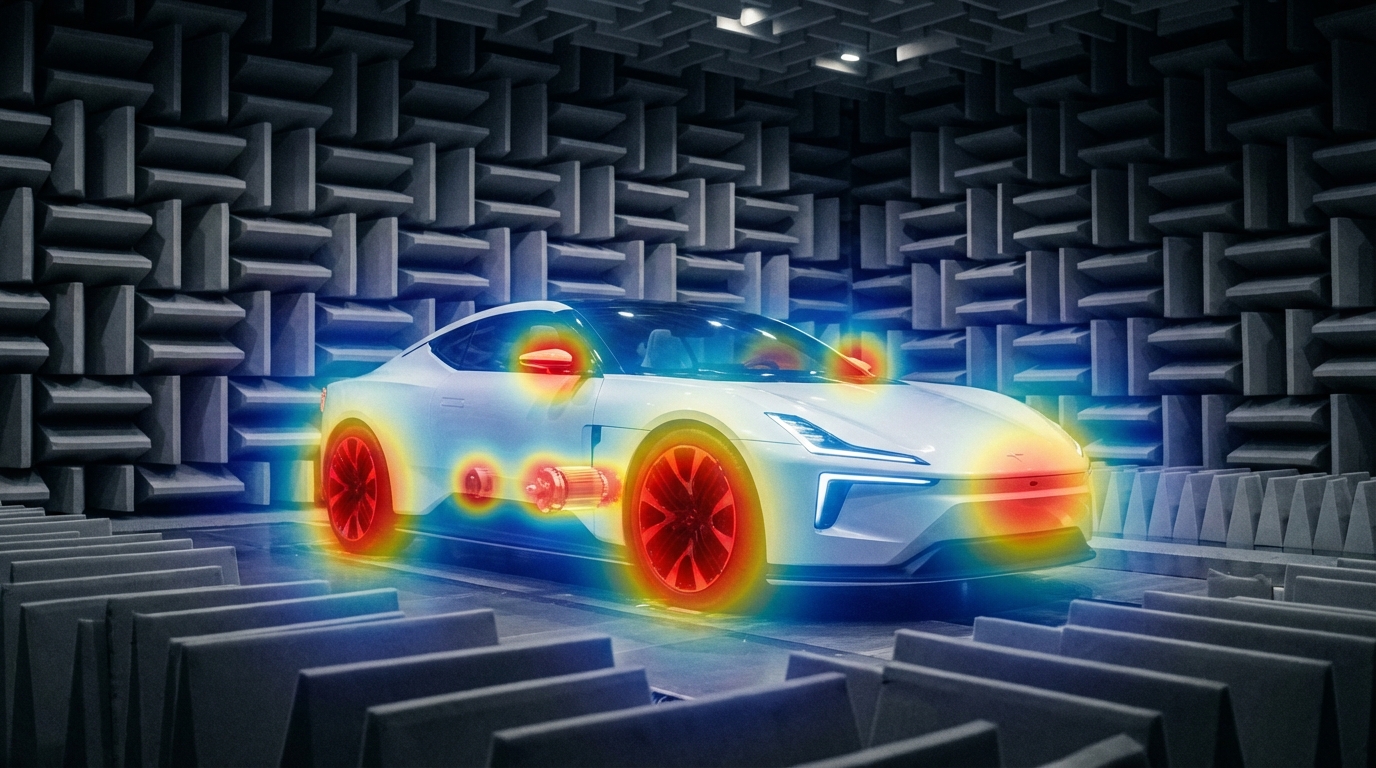
    Electric vehicle in anechoic chamber with acoustic beamforming heatmap overlay

    EV NVH Testing Challenges: Why Acoustic Cameras Are Becoming Essential

    Traditional NVH tools still matter, but they don't cover every EV scenario—acoustic cameras fill the gap with real-time noise visualization and wide-band diagnostics. The Quiet EV Paradox: Why Electric Cars Are Actually "Noisier" It sounds like a paradox — electric vehicles have no roaring engine, yet engineers are finding it harder than ever to achieve a truly quiet cabin. The truth is, when the low-frequency masking effect of the internal combustion engine disappears, every previously hidden noise becomes fully exposed: the high-frequency whine of the electric motor, the electromagnetic hum of the inverter, gear meshing vibrations, wind noise, road noise, even the squeak and rattle of interior trim — nothing can hide anymore. This isn't just a comfort issue. It's fundamentally redefining the automotive industry's approach to NVH (Noise, Vibration, and Harshness) testing. The global automotive NVH testing market is projected to grow from USD 3.51 billion in 2026 to USD 5.75 billion by 2034, at a CAGR of 6.4%. The core driver behind this growth? The electrification revolution. What New Noise Challenges Do EVs Bring? A Fundamental Shift in Frequency Range Traditional ICE vehicle NVH work focuses on the 20–2,000 Hz low-frequency range — engine firing, exhaust systems, crankshaft vibrations. Electric vehicles are fundamentally different: Noise SourceTypical Frequency RangeCharacteristicsElectric motor electromagnetic noise500–5,000 HzSharp tonal noise, varies linearly with speedInverter switching noise4,000–10,000+ HzHigh-frequency hum, related to PWM frequencyGear meshing noise800–3,000 HzParticularly prominent in single-speed reducersBattery charger noise8,000–20,000 HzNear-ultrasonic range, at the edge of human perceptionWind / Road noise200–4,000 HzHighly exposed without engine masking ICE vs EV: The fundamental shift in noise frequency characteristics Key insight: EV noise problems shift from low frequencies to mid-high frequencies (and even ultrasonic ranges). The 100Hz-5kHz range is where most critical NVH issues reside—precisely where human hearing is most sensitive. Traditional NVH testing methods and frequency ranges may no longer be sufficient. New Noise Sources, New Localization Challenges In the ICE era, the assumption that "the engine is the dominant noise source" made things relatively straightforward. In EVs, noise sources become more distributed and complex: Electric drive system: The motor + inverter + reducer form a highly coupled noise system Thermal management: Battery cooling pumps and fans become dominant noise sources at low speeds Regenerative braking: Changes in inverter operating modes during energy recovery produce transient noise Structural transmission paths: Lightweight body structures (aluminum alloy, carbon fiber) have fundamentally different sound insulation characteristics compared to traditional steel This means engineers face a core challenge: How do you quickly and accurately locate the root cause among multiple distributed, dynamically changing noise sources? Sound Quality Design: From "Reducing Noise" to "Crafting Sound" NVH engineering in the EV era is no longer just about "minimizing noise." Consumers expect a carefully designed sound experience: Acceleration should feel "high-tech" without being harsh The cabin should be quiet, but not so silent that it makes the driver uneasy Different driving modes (Sport / Comfort / Eco) should deliver differentiated acoustic feedback This demand for "Sound Design" is expanding NVH testing from pure engineering validation into subjective sound quality evaluation and brand-level acoustic identity. Why Acoustic Cameras Are Becoming Essential for EV NVH Facing these new challenges, traditional NVH testing tools — single-point microphones, accelerometers — remain important but are no longer sufficient for every scenario. Acoustic cameras are filling this gap. Core Advantages of Acoustic Cameras 1. Real-Time Noise Source Visualization Traditional methods require densely placing microphone arrays on the target object — time-consuming and labor-intensive. Acoustic cameras use beamforming technology to generate a noise source heatmap in a single capture, instantly showing "where the noise is and how loud it is." Typical scenario: An EV prototype running on a test bench, the acoustic camera aimed at the electric drive system, instantly revealing that an 800 Hz resonance originates primarily from the right side of the motor — the entire localization process takes less than 5 minutes. Engineer conducting noise source localization test Automotive NVH detection and optimization 2. Wide Frequency Coverage EV noise spans from hundreds of hertz (gear meshing) to tens of thousands of hertz (inverter switching noise) — an enormous frequency range. Critical consideration for NVH: Most EV noise issues occur in the 100Hz-5kHz range—gear meshing, motor electromagnetic noise, wind leaks, HVAC systems. Traditional acoustic imaging cameras (limited to frequencies above 5 kHz) cannot capture these noise sources. Take the CRYSOUND SonoCam Pi (CRY8500 Series) as the ideal example: its 208 MEMS microphone array provides: Beamforming frequency range: 400 Hz - 20 kHz (covers the entire NVH audible spectrum) Near-field acoustic holography range: 40 Hz - 20 kHz (captures low-frequency road noise and structural vibration) Array size: >30 cm (optimized for low-frequency spatial resolution) This makes SonoCam Pi uniquely suited for full-spectrum EV NVH testing—from low-frequency road noise to high-frequency motor whine, all in a single handheld device. 3. Non-Contact Measurement EV electric drive systems are highly integrated and spatially compact. The non-contact measurement approach of acoustic cameras means: No disassembly of any components required No interference with the operating state of the system under test Rapid quality inspection directly on the production line 4. Portability Modern handheld acoustic cameras like the SonoCam Pi can be taken directly to proving grounds, production lines, or customer sites, no complex setup required. Typical Application Scenarios in EV NVH ScenarioApplicationE-drive system NVHLocating order-based noise contributions from motors, inverters, and reducersPass-by noise testingAnalyzing noise source distribution as vehicles pass byInterior squeak & rattle trackingLocating noise from dashboards, doors, seats, and trimEnd-of-line production QCRapid online detection of abnormal noise, replacing subjective human judgmentWind tunnel / Semi-anechoic chamberHigh-precision noise source localization and sound power analysis Real-World Case Study: OEM Dynamic Road Testing Client: A leading Chinese OEMLocation: An OEM test center, internal test trackObjective: Identify in-cabin noise sources during dynamic driving conditions CRY8500 Series SonoCam Pi acoustic cameras Test Setup Device:SonoCam Pi acoustic camera Measurement positions:Rear seat and front passenger seat Target areas:Left and right B-pillars (rear cabin area) Test mode:Beamforming app Frequency range:3,550 Hz - 7,550 Hz Dynamic range:5 dB Key Results SonoCam Pi successfully localized noise sources in real-time during vehicle motion, providing actionable data for OEM's NVH engineering team. The test demonstrated: Real-time localization during dynamic conditions: Unlike fixed laboratory setups, SonoCam Pi captured noise distribution while the vehicle was in motion on the test track Precise frequency-band analysis: By focusing on the 3,550-7,550 Hz range (critical for perceived cabin noise), engineers pinpointed specific contributors rather than measuring overall SPL Rapid testing workflow: Complete B-pillar area scan in minutes, not hours Noise Source Localization Results Key Insight: Traditional microphone arrays would require the vehicle to be stationary in a semi-anechoic chamber. SonoCam Pi enabled on-track diagnostics, dramatically reducing testing time and enabling rapid iteration during vehicle development. Future Trends — What's Next for EV NVH Testing? AI-Driven Noise Classification Machine learning is being integrated into NVH testing workflows: automatically identifying noise types, determining whether anomalies exist, and predicting potential quality issues. The high-dimensional data captured by acoustic cameras is naturally suited for AI analysis. Digital Twins and Simulation-Test Integration Simulation (CAE) predicts noise performance → Acoustic camera validates through physical measurement → Data feeds back to optimize the simulation model. This closed-loop approach is becoming the standard workflow for major OEMs. New Challenges in the Solid-State Battery Era Solid-state batteries have different mechanical properties compared to liquid lithium-ion batteries. Their vibration transmission characteristics and thermal management approaches will introduce new NVH challenges. Stricter Regulations Pass-by noise testing is the fastest-growing NVH sub-segment (CAGR 7.11%), with UNECE pushing for stricter standardized testing requirements, including indoor pass-by testing protocols. Conclusion: The Value of Acoustic Testing, Redefined for the EV Era Electrification hasn't made cars quieter — it has made noise challenges more complex, more nuanced, and more valuable to solve. For automotive OEMs, Tier 1 suppliers, and testing service providers, investing in the right NVH testing equipment is no longer a "nice-to-have" — it's foundational infrastructure for competitiveness. Acoustic cameras—especially those capable of capturing the critical 100Hz-5kHz NVH frequency range—are evolving from "useful auxiliary tools" to "indispensable standard equipment." The CRYSOUND SonoCam Pi stands out as the only handheld acoustic camera that combines: Low-frequency capability (400 Hz beamforming, 40 Hz holography) High spatial resolution (208 microphones, >30 cm array) Near-field + far-field measurements in a single system Portability (handheld, <3 kg, production-ready) Learn more: CRYSOUND SonoCam Pi (CRY8500 Series) → Contact us for NVH testing solutions →
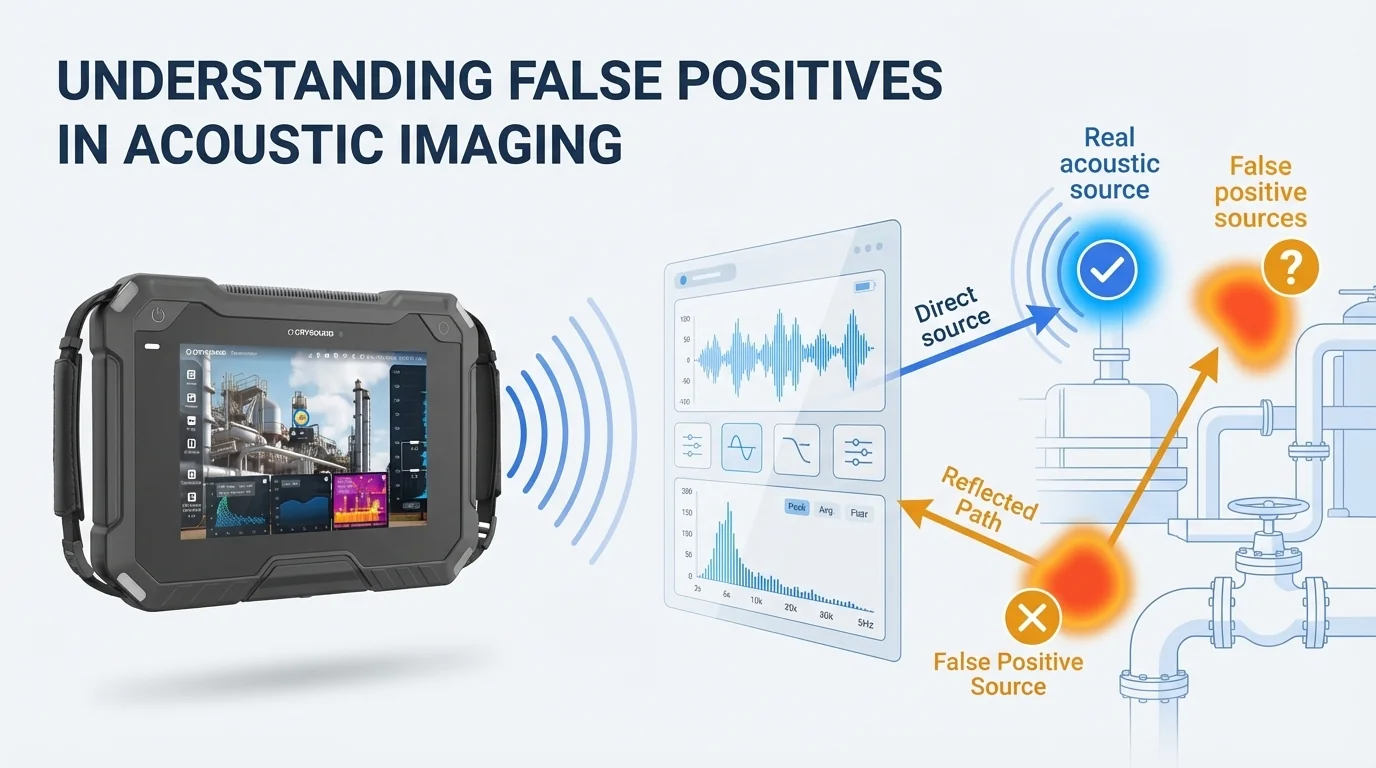
    Banner image for False Positives in Acoustic Imaging blog post featuring CRY8124 camera and diagnostic workflow

    Acoustic Imaging False Positives: Reflections, Beamforming Artifacts, and How to Avoid Them

    You're scanning overhead pipework in a compressor room when your acoustic camera shows a bright hotspot on a steel support beam. You walk over, listen carefully, and check the surface. Nothing. No hiss, no vibration, no leak. The image looks convincing, but the source is not actually on that beam. This is one of the most common acoustic imaging false positives engineers see in the field. Acoustic camera reflections, beamforming artifacts, and background noise can all create ghost images or false hotspots that look like real leaks, discharges, or mechanical faults. That does not mean the camera is malfunctioning. It means the operator needs to separate true sources from indirect paths and side responses. Based on field observations in reflective industrial environments, teams often find that 15–30% of initial acoustic indications should be treated as leads for verification rather than confirmed source locations. In this guide, we'll explain why an acoustic camera shows false hotspots, how to tell acoustic camera reflections from real leaks, and how to reduce beamforming artifacts in noisy factories without slowing down your inspection workflow. What Are False Positives in Acoustic Imaging? False positive (acoustic imaging): An apparent sound source indication on an acoustic camera display that does not correspond to an actual physical source at that location. Caused by physical phenomena including sound wave reflections, beamforming algorithm sidelobes, or environmental noise interference — not by equipment defect. Three related terms often get used interchangeably, but they describe different phenomena: False positive: Any indicated source that isn't real at the shown location Artifact: A systematic error pattern produced by the beamforming algorithm itself (e.g., sidelobes) Ghost image: A reflected or mirrored source — real sound arriving from an indirect path Understanding these distinctions matters because each type has different causes, different on-screen characteristics, and different solutions. Why Acoustic Cameras Show False Hotspots If your acoustic camera shows a hotspot on a wall, support beam, enclosure, or ceiling panel, the most common cause is a reflection rather than a leak at that exact surface. In other words, the hotspot may still be useful, but it is pointing to an indirect path instead of the true source location. If the display shows a halo, ring, or repeating spots around one strong source, that pattern is more likely a beamforming artifact than a second leak. And if the hotspot is broad, unstable, or spread across a noisy production area, environmental noise is usually a better explanation than a discrete defect. For teams using acoustic cameras in compressed air leak detection, it helps to pair this article with our acoustic camera guide and how acoustic imaging works explainer. If you need to quantify the cost of missed leaks before the next survey, use our air leak cost calculator. Common False Positives in Acoustic Cameras Reflections (Ghost Images) Sound waves bounce off hard, smooth surfaces — metal walls, concrete floors, glass panels, polished pipes — just like light reflects off a mirror. When your acoustic camera picks up both the direct sound and the reflected sound, the reflected path appears as a second source at a location where nothing is actually producing noise. Typical scenario: You're imaging a compressed air manifold mounted near a stainless steel wall. The display shows two hotspots — one on the manifold (real) and one on the wall behind it (ghost). The ghost image appears at roughly the same intensity and frequency as the real source. On-screen signature: Ghost images tend to appear at geometrically symmetrical positions relative to the reflecting surface. They share the same frequency spectrum as the real source and often appear at similar or slightly reduced intensity. Sidelobe Artifacts This is the most technically nuanced type. Beamforming algorithms work by mathematically "focusing" the microphone array on each point in the field of view. But just as a flashlight can't produce a perfectly sharp beam edge, beamforming produces a main lobe (the focused area) surrounded by sidelobes — weaker response regions that can register false sources. Typical scenario: You're imaging a single loud leak, but the display shows the main hotspot surrounded by a ring or pattern of secondary spots. These sidelobe artifacts are always clustered around the true source and become more pronounced when the source is loud relative to surrounding noise. On-screen signature: Sidelobes appear as a repeating pattern around the main source — often a ring, halo, or radial spoke pattern. Their intensity is always lower than the main lobe, and they maintain a fixed geometric relationship to the primary source regardless of scanning angle. Key factor: The number of microphone channels directly affects sidelobe levels. A 64-channel array produces more prominent sidelobes than a 128-channel array, which in turn produces more than a 200-channel array. Higher channel counts provide narrower main lobes and lower sidelobe floors. Advanced algorithms like CRYSOUND's HyperVision processing further suppress sidelobes beyond what standard delay-and-sum beamforming achieves. Environmental Noise Interference Not every unwanted indication is a reflection or algorithm artifact. Sometimes, your acoustic camera is accurately detecting a real sound — just not the one you're looking for. Background noise from HVAC systems, nearby machinery, overhead cranes, or even wind can register as apparent sources that get confused with your target. Typical scenario: During a compressed air leak survey in a manufacturing hall, you see multiple hotspots across a wide area. Some are genuine leaks. Others are background machinery noise that happens to fall within your selected frequency band. On-screen signature: Environmental noise sources typically have broader, more diffuse patterns than leaks (which appear as tight, focused hotspots). They also show different frequency characteristics — machinery noise tends to be narrower-band and harmonic, while leak noise is broadband and turbulent. Quick Comparison Type Cause On-Screen Signature Elimination Difficulty Reflections Sound bouncing off hard surfaces Symmetrical ghost image, same frequency as real source Moderate — multi-angle scan + frequency check Sidelobe artifacts Beamforming algorithm side response Ring/halo pattern around main source, lower intensity Low with advanced algorithms (HyperVision) Environmental noise Background machinery in frequency band Diffuse pattern, tonal/harmonic frequency profile Low — frequency filtering + Focus Function How to Identify False Positives: A 4-Step Process When you see an indication you're unsure about, run through these steps before logging it as a confirmed source: Angle change test. Move 2-3 meters to the side and re-scan the same area. Real sources stay in the same physical position on the image. Reflections shift or disappear as you change the angle of incidence. Sidelobes rotate with the main source. Frequency signature check. Switch to spectrum view (if your camera supports it) and examine the frequency profile. Compressed air leaks produce broadband, turbulent noise typically above 20 kHz. Machinery noise has distinct tonal peaks. If the "source" shares an identical spectrum with a known real source nearby, it's likely a reflection. Distance validation. If your camera allows distance-to-source measurement, check whether the indicated distance matches the physical geometry. A reflection off a wall 3 meters behind you will show a source distance that doesn't match the wall's position from your scanning location. Ultrasonic listening. Most acoustic cameras offer a downshift playback feature that converts the directionally-captured ultrasonic signal into audible sound through headphones. Point the camera at the suspect indication and listen. A real compressed air leak produces a distinctive broadband hiss. Sidelobe artifacts and reflections carry no independent acoustic signature — they sound identical to the main source. Environmental noise sounds tonal and harmonic. This lets you verify from your scanning position without walking to the indicated location. Techniques to Minimize False Positives 1. Select the Right Frequency Band Most acoustic cameras allow you to filter by frequency range. Narrowing the band to your target application reduces interference dramatically. For compressed air leaks, focus on 20–50 kHz. For partial discharge, 20–100 kHz. Excluding lower frequencies cuts out most machinery noise. 2. Use Advanced Beamforming Algorithms Not all beamforming is equal. Standard delay-and-sum (DAS) algorithms are computationally simple but produce higher sidelobe levels. Advanced algorithms apply spatial filtering to suppress sidelobes at the processing level. CRYSOUND's HyperVision algorithm, available on the CRY8124 and CRY8120 series, provides up to 10x processing power over standard beamforming, reducing sidelobe artifacts significantly without sacrificing real-time performance. 3. Adopt a Multi-Angle Scanning Protocol Make it standard practice to scan critical areas from at least two different positions. Compare the results. Sources that appear consistently in the same physical location are real. Sources that shift, disappear, or change intensity are false positives. This takes an extra 30 seconds per area and dramatically reduces misdiagnosis. Turning Artifacts into Allies: Using False Positives to Locate Sources Here's where experienced operators separate from beginners. False positives aren't just noise to eliminate — they carry information about the acoustic environment that you can exploit. Reflection Mapping If you see a ghost image on a metal wall, you've just learned something valuable: there's a real sound source at the geometrically mirrored position. The reflection tells you the sound wave's travel path. In complex piping environments where direct line-of-sight to a leak is blocked, reflected images on nearby surfaces can reveal the general direction and approximate distance of sources you can't see directly. Pro technique: When scanning in confined spaces with multiple reflective surfaces, intentionally note where ghost images appear. The pattern of reflections triangulates the true source location, even when the source is behind equipment or above a ceiling panel. Sidelobe Pattern Reading Sidelobes always radiate symmetrically from the main lobe. When you see a sidelobe pattern, the center of that pattern is your real source — guaranteed. In environments where obstructions partially block your view, the visible sidelobes can confirm the direction of a source that's partially hidden. If the sidelobe "ring" is only visible on one side, the true source is on the opposite side, behind whatever's blocking your view. Spatial Focusing (ROI Isolation) In noisy industrial environments, you can't shut down surrounding equipment just to get a cleaner acoustic image. Instead, use your camera's Focus Function: draw a region of interest (ROI) directly on the screen around the area you want to investigate. The camera restricts its beamforming analysis to that region only, effectively suppressing sound sources outside the selected area. This is particularly powerful when combined with frequency band filtering. Narrow the frequency range to your target application (e.g., 20–50 kHz for leak detection), then draw an ROI around the suspect zone. The double filter — spatial plus spectral — dramatically reduces environmental noise interference without requiring any change to the plant's operating conditions. What previously looked like a cluttered display with overlapping hotspots becomes a clean, focused view of the area that matters. Quick Reference Checklist Eliminating false positives: Set correct frequency band for target application Scan from at least two angles Check frequency spectrum of ambiguous sources Use ultrasonic listening to verify auditory signature before logging Leveraging false positives: Note reflection positions to triangulate hidden sources Read sidelobe patterns to confirm source direction Use Focus Function (ROI) to isolate target area from surrounding noise Need help diagnosing false positives? Talk to our application engineers → Frequently Asked Questions How common are false positives in acoustic imaging? Every acoustic camera produces some false positives. They are an inherent characteristic of beamforming physics, array geometry, and reflective environments rather than a product defect. With the right scanning workflow, most operators can tell a real source from a false hotspot within seconds. Why does my acoustic camera show a hotspot on the wall? The most common reason is reflection. The wall is acting like an acoustic mirror, so the camera detects indirect sound energy and maps it to the mirrored position. If the hotspot shifts or disappears when you change your scanning angle, you are likely looking at a reflection instead of a real source on that wall. What is the difference between a reflection and a beamforming artifact? A reflection is real sound reaching the array by an indirect path after bouncing off a surface. A beamforming artifact is a pattern generated by the imaging algorithm itself, often appearing as a halo or repeating side response around a strong source. Reflections usually move with geometry and angle; beamforming artifacts stay locked to the true source pattern. Can reflections be completely eliminated? No. As long as there are hard, smooth surfaces in the environment, sound will reflect. However, you can reduce their impact by scanning from multiple angles, matching spectra, and using region-of-interest controls to isolate the target area. Does a higher microphone channel count reduce artifacts? Yes. More channels generally provide a narrower main lobe and a lower sidelobe floor, which means fewer misleading side responses around strong sources. This is one reason acoustic camera specifications matter when you compare systems. How do I handle false positives in noisy factory environments? Use three filters together: narrow the frequency band to the target application, restrict the imaging area with an ROI or focus function, and confirm suspicious hotspots from a second angle. In most plants, that combination separates real leak-like sources from machinery noise fast enough for practical inspections. Can acoustic reflections actually help locate the real source? Yes. Reflections reveal the sound path, which means a ghost image can still tell you where to keep searching. In cluttered piping or enclosed machinery spaces, reflection patterns often help experienced operators triangulate the hidden source more quickly.


    Get in touch

    If you are interested or have questions about our products, book a demo and we will be glad to show how it works, which solutions it can take part of and discuss how it might fit your needs and organization.

    Support Support
    Product Catalogs Product Catalogs Solutions Solutions User Manuals User Manuals Software Download Software Download Product Inquiry Product Inquiry Schedule Demo Schedule Demo Technical Support Technical Support +86-571-88225128 +86-571-88225128
    Request Quote 0
    Request Quote