


Using a wired headphone acoustic measurement workflow as an example, this article explains how OpenTest connects to an NI USB-4431 DAQ device and supports a complete acoustic test workflow, from test setup, channel configuration, and signal acquisition to frequency response analysis, distortion analysis, report generation, and sequence-based automation. The workflow helps engineering teams upgrade their test software platform while preserving existing hardware investments.
When acoustic and NVH teams upgrade a test system, the main concern is often not how many functions the new software offers. The more practical question is whether existing DAQ hardware, sensors, fixtures, and test setups can continue to be used. For laboratories and engineering teams that already rely on NI DAQ hardware, replacing hardware, rebuilding the test bench, and revalidating the entire workflow can significantly increase adoption cost.
OpenTest provides a smoother path for this type of system upgrade through open hardware access. In this example, OpenTest connects to an NI USB-4431 DAQ device and uses a wired headphone frequency response and distortion test to show how an existing acquisition setup can be integrated into the OpenTest platform.
Test Scenario: Wired Headphone Frequency Response and Distortion Testing
Frequency response and distortion testing are common baseline measurements in headphone development, validation, and quality control. Frequency response shows how a headphone outputs sound across different frequencies, helping engineers evaluate whether low, mid, and high frequency performance meets the target design. Distortion testing helps identify additional harmonic components generated during playback, which may indicate issues related to the driver, structure, assembly, or acoustic design.
This workflow can be applied to several headphone acoustic testing scenarios:
- R&D tuning: Compare frequency response changes across acoustic structures, tuning options, or prototype versions.
- Design validation: Verify whether headphone output meets target curves or internal limits.
- Sample evaluation: Identify clear differences between samples or production batches.
- Production sampling: Review frequency response and distortion performance in lab or production-line environments.
- Failure analysis: Investigate channel imbalance, weak low-frequency output, high-frequency anomalies, or elevated distortion.
In a typical test setup, the wired headphone is placed in an artificial ear or acoustic coupler. A sweep signal is played through the headphone, the acoustic response is acquired, and OpenTest is used to analyze frequency response and distortion results.
Test Setup: Preserving the Existing Hardware Chain
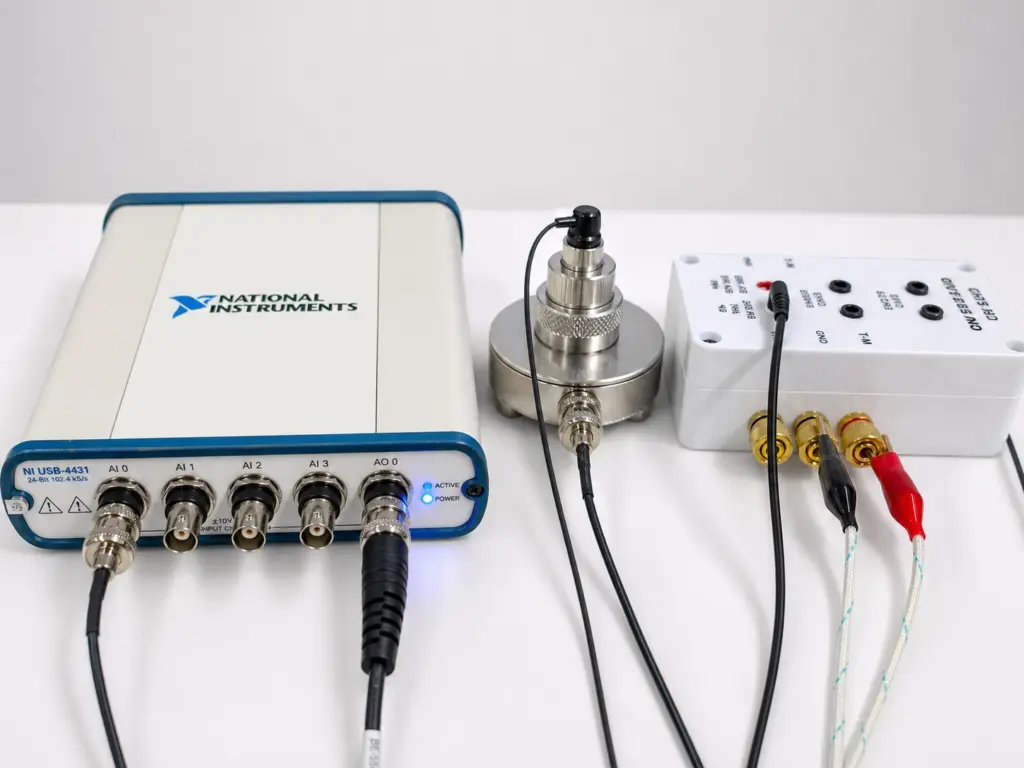
Figure 1: OpenTest connecting to NI USB-4431 for wired headphone acoustic testing
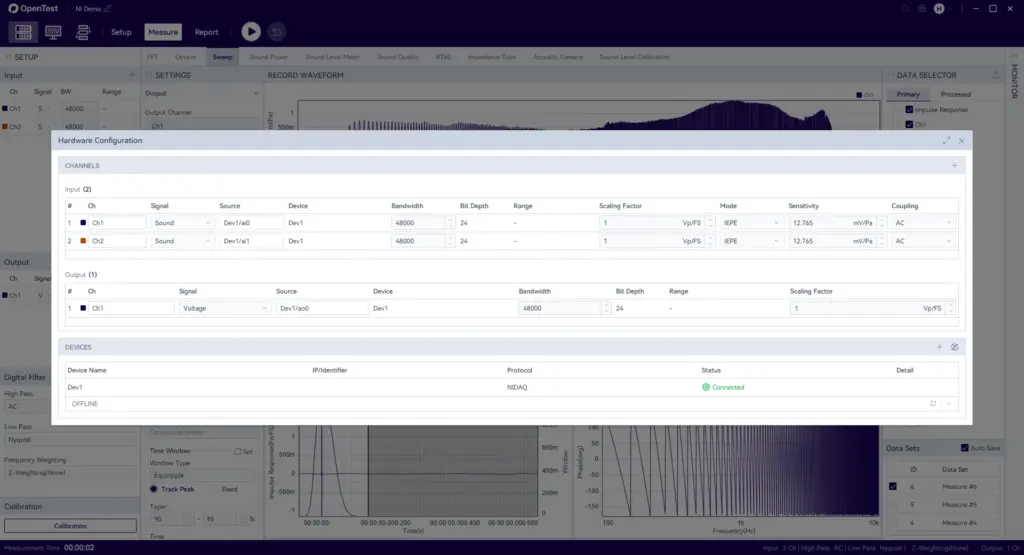
Figure 2: Configuring NI USB-4431 acquisition channels in OpenTest
Before testing starts, engineers identify the device and configure the acquisition channels in OpenTest. Based on the test chain, they can set input channels, sampling parameters, channel names, and calibration information, so the acquired signal is correctly associated with the headphone output.
For teams with an existing test system, the value is straightforward: the hardware chain can remain in place, while test configuration and data analysis are managed in OpenTest.
Sweep Test: Analyzing Output Across Different Frequencies
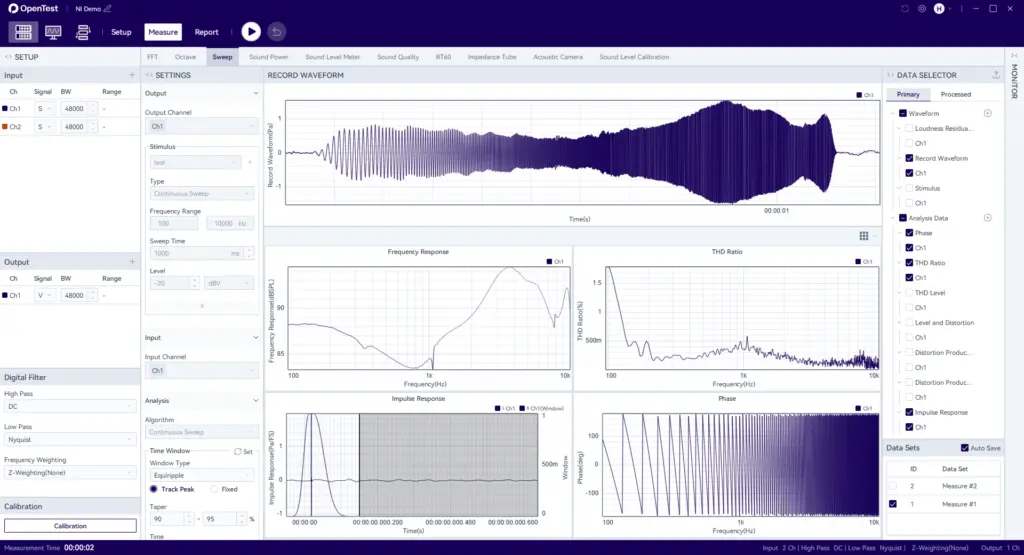
Figure 3: Wired headphone frequency response and distortion test results in OpenTest
After channel configuration, engineers can run the frequency response test. Frequency response testing usually uses a sweep signal or selected frequency points to observe sound pressure output across the frequency range. Engineers can use the resulting curve to evaluate the overall tuning trend, such as low-frequency extension, mid-frequency smoothness, and high-frequency peaks or dips. For stereo headphones, left and right channel consistency can also be reviewed.
Distortion testing focuses on whether the headphone produces additional harmonic components during playback. Even when the frequency response curve is close to the target, certain frequency bands may still show elevated distortion, which can affect listening quality or reveal structural issues. By reviewing distortion results in OpenTest, engineers can assess whether an anomaly may be related to driver performance, assembly consistency, acoustic cavity design, or test conditions.
This example shows that connecting OpenTest to NI DAQ hardware is not only about recognizing a device. It is about bringing existing acquisition hardware into a complete acoustic testing workflow, covering channel configuration, signal acquisition, frequency response analysis, distortion analysis, result review, data export, and report preparation within one platform.
Report Generation: Making Results Easier to Review and Archive
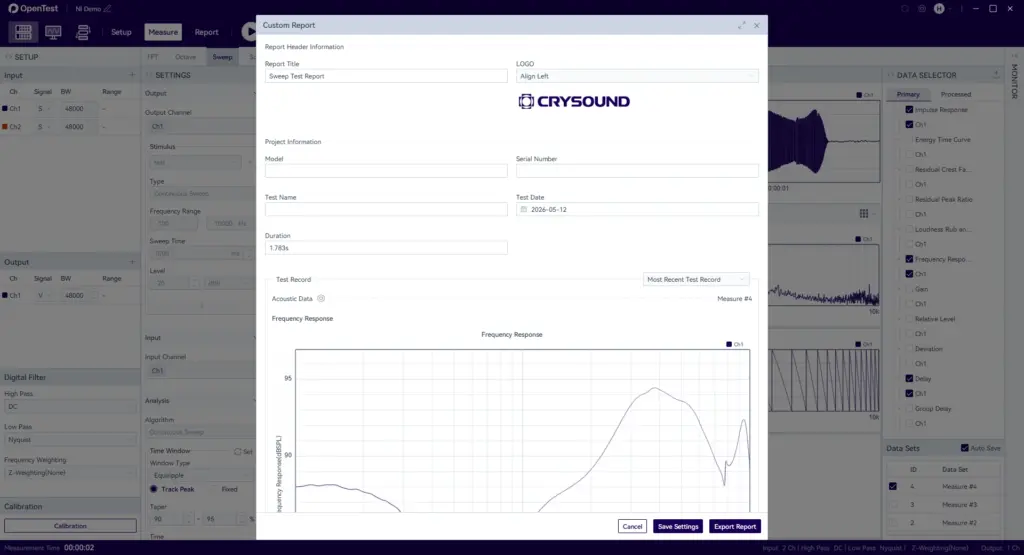
Figure 4: OpenTest generating a wired headphone acoustic test report
After frequency response and distortion analysis, test results often need to be reviewed, compared, and archived. For R&D validation and quality control teams, a single curve is rarely the end of the workflow. Engineers usually need to organize test conditions, channel settings, frequency response curves, distortion results, and key judgment information into a traceable report for internal review, sample comparison, or follow-up analysis.
In OpenTest, test data and analysis results can continue into report generation. Engineers can organize frequency response curves, distortion curves, test parameters, and result notes around the same test task, reducing the need to manually capture screenshots, copy data, and reformat content across multiple tools. This improves reporting efficiency and helps keep test records aligned with analysis results.
Sequence Mode: Turning the Workflow into an Automated Test Task
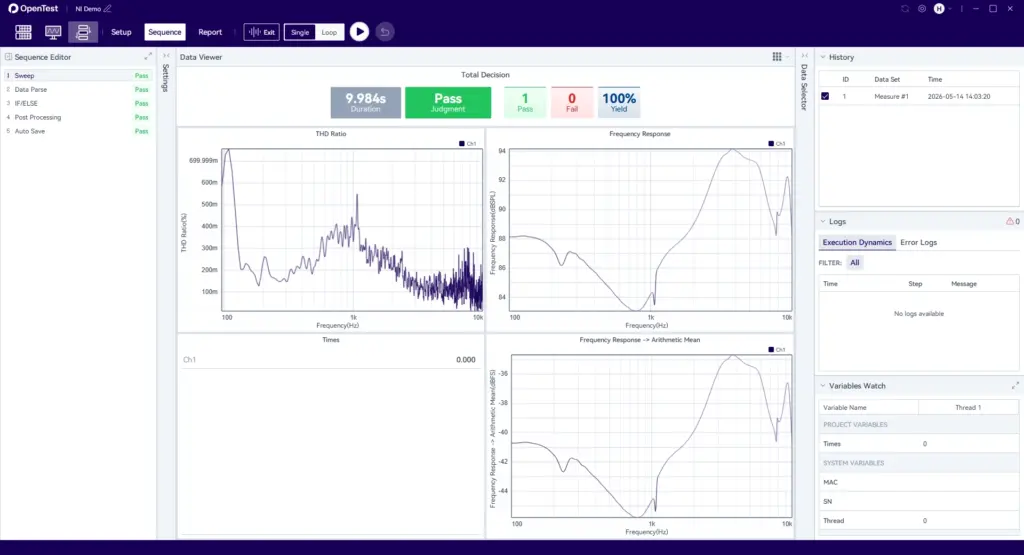
Figure 5: Configuring a wired headphone acoustic test sequence in OpenTest
Once the test workflow is stable, engineers can use OpenTest Sequence Mode to configure signal acquisition, frequency response analysis, distortion analysis, result judgment, and report output as a standard test sequence. Instead of repeating each operation manually, engineers can run the predefined workflow and reuse the same test method across R&D validation, sample comparison, and production sampling.
For teams that repeatedly test similar products, Sequence Mode helps turn a validated workflow into a reusable template. When testing different samples, batches, or operators, test steps, parameter settings, and output formats can remain more consistent, creating a stronger foundation for automated testing and standardized test management.
For users with existing NI DAQ hardware, this approach provides several practical benefits:
- Preserve the existing hardware chain: Keep the current acquisition setup and reduce upgrade cost.
- Validate through a real acoustic test scenario: Use wired headphone frequency response and distortion testing to verify the workflow.
- Unify testing and analysis: Reduce switching between device configuration, data acquisition, and result analysis tools.
- Improve result review efficiency: Use frequency response curves, distortion results, and test data for comparison, archiving, and report output.
- Support future expansion: Extend a stable single-test workflow into standardized, sequence-based, and automated testing.
For acoustic laboratories, R&D validation teams, and production test teams that already use NI DAQ hardware, OpenTest offers a practical upgrade path: preserve existing hardware assets while connecting headphone acoustic measurements and other test workflows into a more unified software platform.
Beyond the NI USB-4431 and wired headphone frequency response testing discussed in this article, OpenTest's open hardware access capability can also support more types of data acquisition devices and audio interfaces, helping users build more flexible test systems based on their existing hardware setup. In terms of test capabilities, OpenTest is not limited to frequency response and distortion analysis. It can also be extended to sound power, sound quality, electroacoustic testing, and other acoustic and NVH measurement scenarios. For teams planning a phased upgrade of their test platform, this means OpenTest can not only work with existing hardware, but also help expand test capabilities and automation workflows over time.
The free version of OpenTest is available from the OpenTest official website. To learn more about OpenTest solutions or explore OpenTest for DAQ integration, acoustic testing, and automated workflows, please fill out the Get in Touch form below.


