


In industrial testing, research, and quality validation, data acquisition devices (DAQs / audio interfaces / measurement microphone front-ends) are the "front door" of the entire system. As technology and applications become more specialized, a wide variety of DAQ devices has emerged:
- High-precision front-ends designed specifically for acoustics and vibration
- General-purpose dynamic signal acquisition modules
- Common USB sound cards and measurement microphones
Hardware is not the bottleneck anymore. The real challenge is:
How do you connect, configure, and manage devices from different brands and protocols in one software platform?
OpenTest is built around this pain point. With an open, multi-protocol hardware access architecture, it turns acquisition from "isolated devices" into a unified platform, enabling cross-brand, multi-device data acquisition and analysis.
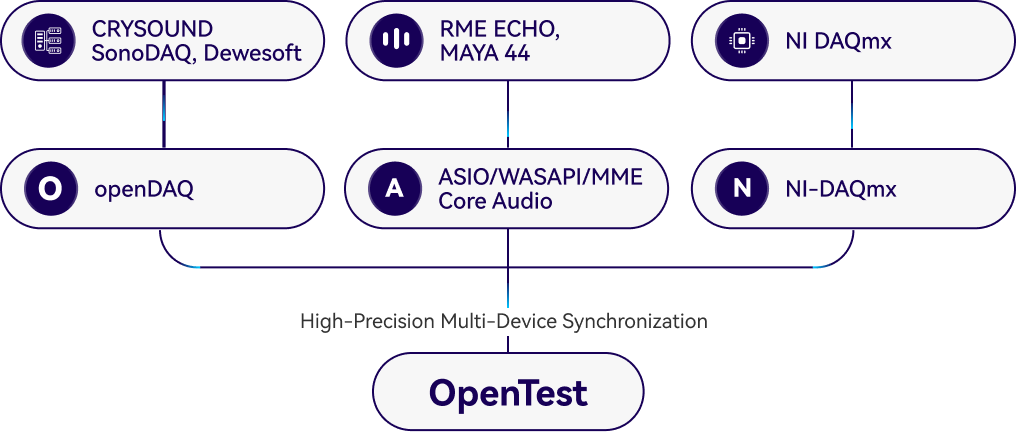
Multi-Protocol Hardware Access: Reducing Vendor Lock-In
OpenTest supports several mainstream connection methods. You can choose the appropriate protocol based on your hardware type and driver environment (actual compatibility depends on software version and device drivers):
- openDAQ - For open DAQ integration. Used to connect open hardware such as CRYSOUND SonoDAQ and manage channels and acquisition parameters in a unified way
- ASIO / WASAPI / MME / Core Audio - Mainstream audio interfaces on Windows and macOS, supporting professional audio interfaces and USB measurement microphones such as RME, Echo, miniDSP, etc.
- Other proprietary protocols - Can be added according to project requirements

This means you no longer need to be locked into a single hardware brand or a single piece of software. Existing devices can be brought smoothly under one platform for centralized management.
Multi-Device Collaboration: One Project, Many Acquisition Tasks
Complex tests often require multiple signal sources to be acquired together, for example:
- Dynamic signals such as microphones and accelerometers
- Operating parameters such as speed, temperature, pressure, torque
- Auxiliary audio paths for monitoring and playback
With OpenTest's multi-protocol architecture, you can manage multiple devices within the same project. For NVH and structural testing, this kind of cross-device collaboration significantly reduces repetitive work like:
Recording in multiple software tools → exporting → manual time alignment → re-analysis
Getting Started: Connecting Devices Quickly
- Connect your data acquisition device to the PC running OpenTest
- USB connection, or
- Network connection (ensure the device and PC are on the same subnet)
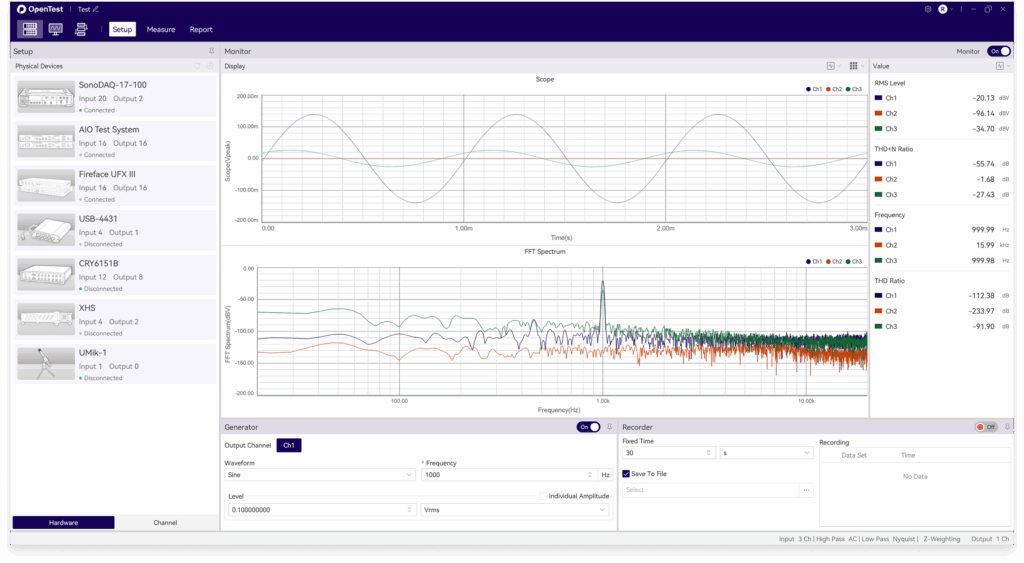
- In the Hardware Setup panel, click the "+" icon in the upper-right corner. OpenTest will automatically scan for connected devices
- Check the devices you want to use and click Confirm to add them to the active device list
- Switch to the Channel Setup list, click the "+" icon in the upper-right corner, select the channels required for the current project (channels from different devices can be combined), and click Confirm to add them to the project
- Select the channels; OpenTest will automatically start real-time monitoring and analysis. You can then switch to different measurement modules according to your test needs
Presets + Fine Tuning: Easy to Start, Easy to Standardize
To help teams enter the testing state quickly, OpenTest supports a "presets + adjustments" configuration approach:
- Turn commonly used hardware parameters and acquisition settings into reusable templates
- Apply templates directly when creating a new project to avoid starting from scratch
- Still keep full flexibility to fine-tune settings for different operating conditions and devices
For production line or regression testing, templating adds an important benefit: uniform test conditions, comparable results, and traceable processes across time and across operators.
Logging and Monitoring: Designed for Long-Term Stability
For long-duration, multi-device acquisition, the worst case is discovering that something dropped out halfway. OpenTest provides observability features to address this:
- Device and channel status monitoring - Quickly detect disconnections, overloads, and abnormal inputs
- Operation and error logs - Record key actions and error events to support troubleshooting and process optimization
This is especially critical for continuous production testing and durability tests, significantly reducing the chance of "realizing halfway through that nothing was actually recorded."
Typical Application Scenarios
- Acoustics and vibration R&D - Use the same platform to connect front-end DAQs and audio interfaces, quickly complete acquisition, analysis, and report generation
- Automotive NVH / structural testing - Acquire noise, vibration, and operating parameters together, minimizing cross-software alignment work
- Production line automated testing - Template-based configuration + monitoring/logging + automated reporting to improve consistency and traceability
OpenTest's goal is not to make you replace all your hardware, but to bring your existing hardware together on one platform so that data acquisition becomes more efficient, more controllable, and much easier to standardize.
Visit www.opentest.com to learn more about OpenTest features and hardware options, or contact the CRYSOUND team for demos and application support.


