1. Home
  2. Blogs
  3. ISO 3744 Sound Power Testing with OpenTest

December 5, 2025

ISO 3744 Sound Power Testing with OpenTest

Under regulations such as the EU Machinery Noise Directive, more and more products—from toys and power tools to IT equipment—are required to declare their sound power level on labels and in documentation, rather than simply claiming they are “quiet enough.”

For typical office devices like notebook computers, idle noise is often around 30 dB(A), while full-load operation can approach 40 dB(A). These figures are usually obtained from sound power measurements performed in accordance with ISO 3744 and related standards.

Sound Pressure vs. Sound Power

A noise source emits sound power, while what we measure with a microphone is sound pressure.

Sound pressure varies with room size, reverberation, and microphone distance, whereas sound power is the source’s own “noise energy” and does not change with installation or environment. That makes sound power a better metric for external product noise specification.

In simple terms:

  • Sound power is the cause – the energy emitted by the source (unit: W / dB);
  • Sound pressure is the effect – the sound pressure level we hear and measure (unit: Pa / dB).

ISO 3744 defines how to do this in an “essentially free field over a reflecting plane”: arrange microphones around the source on an enveloping measurement surface, measure the sound pressure levels on that surface, then apply specified corrections and calculations to obtain stable, comparable sound power levels.

Device Under Test: An Everyday Notebook Computer

Assume our DUT is a 17-inch office notebook. The goal is to determine its A-weighted sound power level under different operating conditions (idle, office load, full load), in order to:

  • Compare different cooling designs and fan control strategies;
  • Provide standardized data for product documentation or compliance;
  • Supply baseline data for sound quality engineering (for example, whether the fan noise is annoying).

The test environment is a semi-anechoic room with a reflecting floor. The notebook is placed on the reflective plane, and multiple microphone positions are arranged around it (using a hemispherical frame or a regular grid). Overall, the setup satisfies ISO 3744 requirements for the measurement surface and environment.

Measurement System: SonoDAQ Pro + OpenTest Sound Power Module

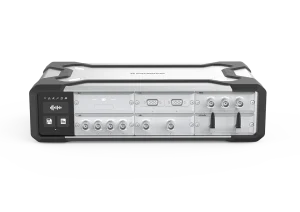
On the hardware side, we use SonoDAQ Pro together with measurement microphones, arranged around the notebook according to the standard.

OpenTest connects to SonoDAQ via the openDAQ protocol. In the channel setup interface, you select the channels to be used and configure parameters such as sensitivity and sampling rate.

From Standard to Platform: Why Use OpenTest for Sound Power?

OpenTest is CRYSOUND’s next-generation platform for acoustic and vibration testing. It supports three modes—Measure, Analysis, and Sequence—covering both R&D laboratories and repetitive production testing.

For sound power applications, OpenTest implements a sound-pressure-based solution fully compliant with ISO 3744 (engineering method), and also covering ISO 3745 (precision method) and ISO 3746 (survey method). You can flexibly select the test grade according to the test environment and accuracy requirements. The platform includes dedicated sound power report templates that generate standards-compliant reports directly, avoiding repeated manual work in Excel.

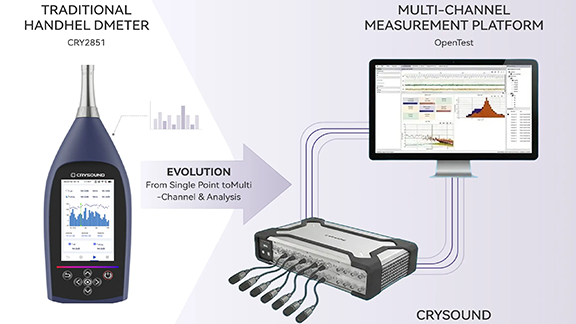
On the hardware side, OpenTest connects to multi-brand DAQ devices via openDAQ, ASIO, WASAPI, and NI-DAQmx, enabling unified management of CRYSOUND SonoDAQ, RME, NI and other systems. From a few channels for verification to large microphone arrays, everything can be handled within a single software platform.

Three Steps: Running a Standardized ISO 3744 Sound Power Workflow

Step 1: Parameter Setup and Environment Preparation

After creating a new project in OpenTest:

  1. In the channel setup view, select the microphone channels to be used and configure sensitivity, sampling rate, frequency weighting, and other parameters.
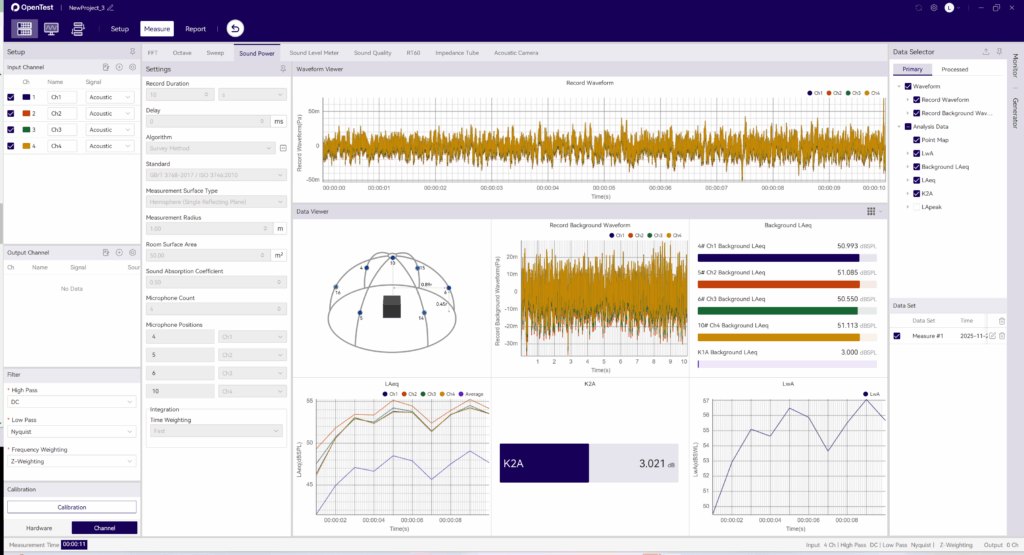
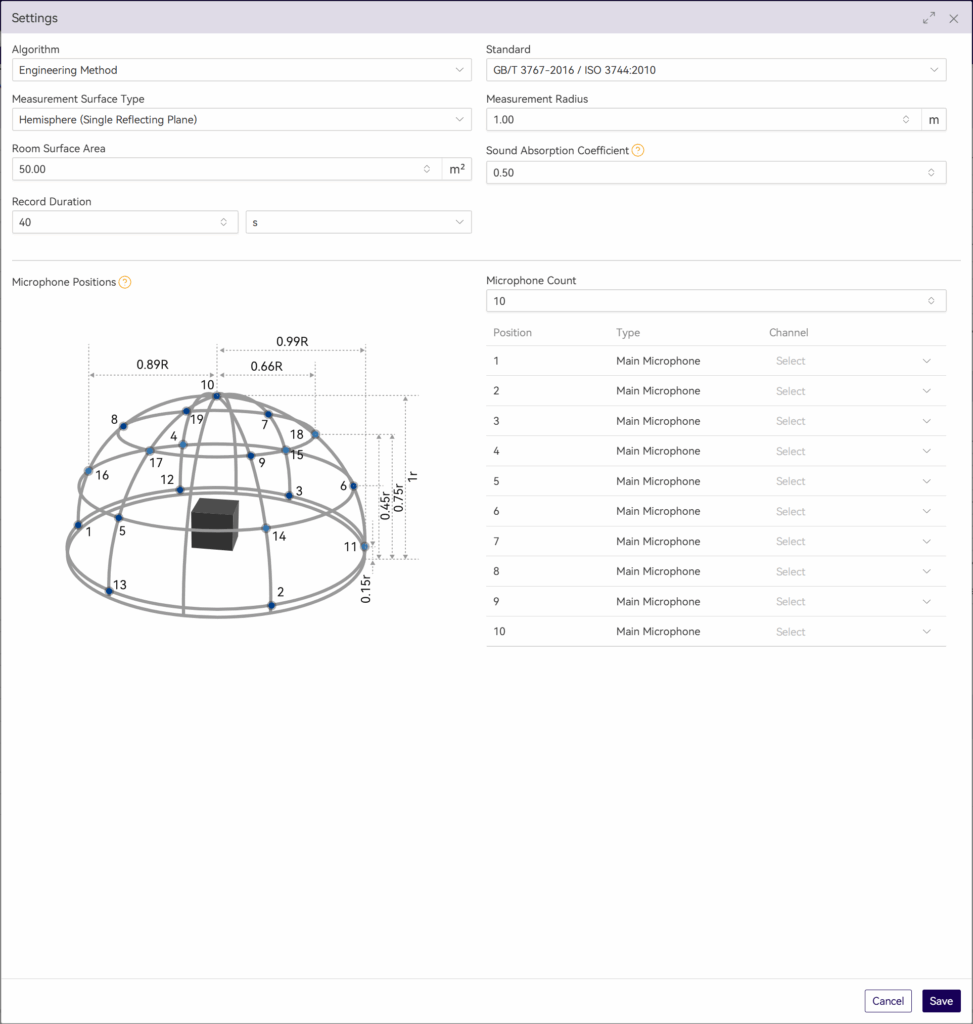
  2. Switch to Measure > Sound Power and set the measurement parameters:
    • Test method and measurement-surface-related parameters;
    • Microphone position layout;
    • Measurement time;
    • Other parameters corresponding to ISO 3744.

This step effectively turns the standard’s clauses into a reusable OpenTest scenario template.
Step 2: Measure Background Noise First, Then Operating Noise

According to ISO 3744, you must measure sound pressure levels on the same measurement surface with the device switched off and device running, in order to perform background noise corrections.

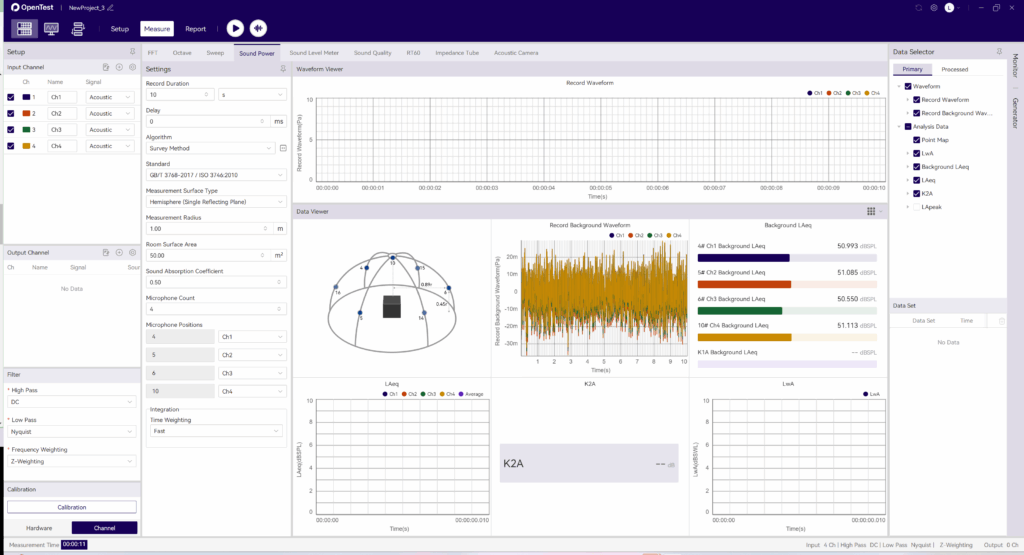
In OpenTest, this is implemented as two clear operations:

  • Acquire background noise
    Click the background-noise acquisition icon in the toolbar. OpenTest records ambient noise for the preset duration.
    • In the survey method, OpenTest updates LAeq for each channel once per second;In the engineering and precision methods, it updates the LAeq of each 1/3-octave band once per second.
  • Acquire operating noise
    After background acquisition, click the Test icon. OpenTest will:
    a. Record notebook operating noise for the preset duration;
    b. Update real-time sound pressure levels once per second;
    c. Automatically store the run as a data set for later replay and comparison.
Step 3: From Multiple Measurements to One Standardized Report

After completing multiple operating conditions (for example: idle, typical office work, full-load stress):

  • In the data set view, select the records you want to compare and overlay them to observe sound power differences under different conditions;
  • In the Data Selector, click the save icon to export the corresponding waveform files and CSV data tables for further processing or archiving;
  • Click Report in the toolbar, fill in project and device information, select the data sets to include, adjust charts and tables, and export an Excel report with one click.
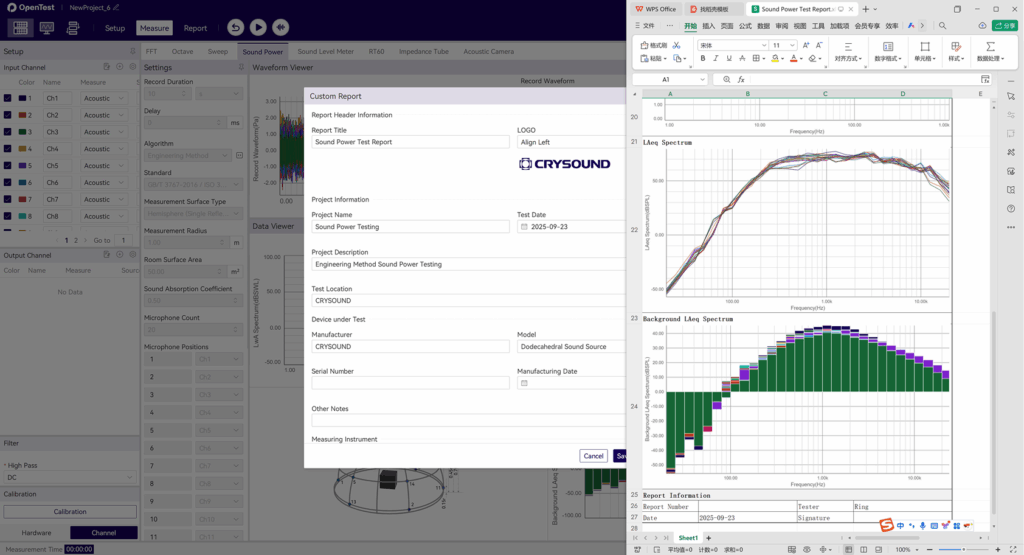
The report includes measurement conditions, measurement surface, band or A-weighted sound power levels, background corrections, and other key information. It can be used directly for internal review or regulatory/customer submissions, following the same idea as other standardized sound power reporting solutions.

From a Single Notebook Test to a Reusable Sound Power Platform

Running an ISO 3744 sound power test on a notebook is just one example. More importantly:

  • The standardized OpenTest scenario can be cloned for printers, home appliances, power tools, and many other products;
  • Multi-channel microphone arrays and SonoDAQ hardware can be reused across projects within the same platform;
  • The test workflow and report format are “locked in” by the software, making it easier to hand over, review, and audit across teams.

If you are building or upgrading sound power testing capability, consider using ISO 3744 as the backbone and OpenTest as the platform that links environment, acquisition, analysis, and reporting into a repeatable chain—so each test is clearly traceable and more easily transformed from a one-off experiment into a lasting engineering asset.

Visit www.opentest.com to learn more about OpenTest features and hardware solutions, or contact the CRYSOUND team by filling out the “Get in touch” form below.
Get in touch

Are you seeking more information about CRYSOUND’s solutions or need a demo? Contact us via the form bleow and one of our sales or support engineers will connect with you.

Read more

OpenTest Website Launch : Reimagining Audio & NVH Testing

The all-new OpenTest website (opentest.com) is live, bringing product capabilities, ecosystem, docs, updates, and download into a single, streamlined experience to help engineers, researchers, and manufacturers get productive fast.

At a Glance

  • Clear information architecture with top-level navigation to Features / Hardware / Plugin / Pricing / About / Docs / Updates / Download.
  • Three work modes tailored to real workflows: Measure, Analysis, Sequence.
  • Feature matrix in one view covering Monitor, FFT, Octave, Sweep, Sound Power, Export/Report.
  • Open ecosystem for hardware and plugins, supporting mainstream audio/DAQ interfaces and multiple development languages.
  • Transparent plans with Community, Professional, and Enterprise options.

Bulit for Engineers

Three Work Modes

  • Measure Mode — Real-time acquisition with live metrics plus post-run analysis for flexible review.
  • Analysis Mode — Deep, offline analysis from data cleaning to computation.
  • Sequence Mode — Purpose-built for repetitive/production tests, integrating acquisition → analysis → storage → reporting for repeatable throughput.

Key Capabilities

Monitor, FFT, Octave, Sweep, Sound Power, Export, and Report—covering mainstream acoustic and vibration analysis in lab or line environments.

Open Ecosystem: Hardware & Plugins

  • Open Hardware Access Protocol with compatibility for openDAQ, ASIO, WASAPI (and optional private protocols such as NI-DAQmx) to connect a wide range of DAQ devices.
  • Three-layer plugin architectureAlgorithm / Theme / Application — enabling full-stack extensibility. Develop with Python, MATLAB, LabVIEW, C++, and more.

Open-Source Core + Commercial Capabilities

  • Community
    Fully open-source core functions; 2 channels; Algorithm plugins; built-in Monitor/FFT/Octave/Basic Sweep/General Report; community forum support.
  • Professional
    Up to 24 channels; Algorithm + Theme plugins; Advanced Sweep and Sound Power; email support.
  • Enterprise
    Unlimited channels; Algorithm + Theme + Application plugins; white-label options and customization; enterprise-grade support and compliance.

Get Started in Seconds

Download for Windows from the homepage.

The relaunch brings open ecosystem + clear capability boundaries + transparent plans onto one page—smoothing both decision-making and deployment. If you’re building or upgrading an acoustic/NVH testing platform, start with the new site, pick a plan, download, and close the loop from acquisition to reporting—faster.

OpenTest: Acoustic & NVH Testing in Three Steps

In acoustic and vibration testing, engineering teams often find themselves jumping between multiple software tools and data acquisition systems from different vendors. Interfaces vary, workflows are fragmented, and new engineers can spend a significant amount of time just learning the tools before they can focus on the engineering problem itself.

OpenTest, developed by CRYSOUND, is a next-generation acoustic and NVH testing platform designed for engineers, researchers, and manufacturers. Built around the principles of an open ecosystem, AI-driven intelligence, and high compatibility, it allows users to complete the entire workflow—from acquisition to reporting—within a single software environment.

OpenTest supports three operating modes: Measure, Analysis, and Sequence, covering both laboratory validation and repetitive production testing. Core capabilities include real-time monitoring and analysis, FFT and octave analysis, sweep analysis, sound power testing, sound level meter functions, and sound quality analysis. The platform also provides standard test reports and dedicated sound power reports that comply with international standards.

On the hardware side, OpenTest connects to a wide range of multi-brand DAQ devices via mainstream audio protocols such as openDAQ, ASIO, and WASAPI, as well as optional proprietary drivers such as NI-DAQmx, enabling unified management of CRYSOUND SonoDAQ, RME, NI, and other devices within a single platform. On the software side, its modular plugin architecture exposes interfaces for Python, MATLAB, LabVIEW, C++ and more, making it easy for teams to package in-house algorithms and domain applications as plugins and deploy them within the same environment.

From Acquisition to Report: A Three-Step Quick-Start Workflow

1. Installation and Basic Connectivity – Let the Signals In
  • Download the latest installer from the official website www.opentest.com and complete the installation.
  • Connect your DAQ device to the PC; for your first trial, you can simply use the built-in PC sound card to run a quick test.
  • In the OpenTest setup section, scan for available devices and select the devices and channels you want to use. Once added to the project, your basic connectivity is complete.

2. Run Basic Tests with Real-Time Analysis – See It First, Then Optimize
  • In the channel management view, select the input/output channels you want to use and configure key parameters such as sensitivity, sampling rate, and gain.
  • The system automatically activates the Monitor panel, where you can view real-time waveforms, FFT spectra, and key metrics such as RMS level and THD at a glance.
  • When needed, you can enable the built-in signal generator to output excitation signals and use the recording function for long-duration acquisition, preserving data for later comparison and analysis.

3. Perform In-Depth Analysis and Reporting in the Measure Module – Turning Data into Decisions
  • Switch to the Measure module to access advanced applications such as FFT analysis, octave analysis, sweep analysis, sound power testing, sound level meter, and sound quality—providing everything you need for deeper investigation.
  • Use the data set functionality to review and overlay historical records, so you can compare different samples, operating conditions, or tuning strategies side by side.
  • Waveforms and analysis results can be exported at any time. With the reporting function, you can generate test reports with a single click, closing the loop from test execution to final deliverables.

Who Is OpenTest For?

  • New acoustic and vibration test engineers who want to establish a complete workflow quickly using a single toolchain.
  • Laboratories and corporate teams that need to manage multi-brand hardware and consolidate everything into one unified software platform.
  • Project teams in automotive NVH, consumer electronics, and industrial diagnostics that require high channel counts, automation, and AI-enhanced analysis capabilities.

Wherever you are on your testing infrastructure journey, OpenTest lets you start with a free entry-level edition and adopt an open, intelligent, and scalable ecosystem with a low barrier to entry. Visit www.opentest.com to explore detailed features, supported hardware, and licensing and plan options, and book a demo to see how OpenTest and CRYSOUND can help you build an efficient, open, and future-ready acoustic and vibration testing platform.

SonoDAQ Pro: Flexible Acoustic and Vibration DAQ System

In acoustic and vibration testing, flexibility is a decisive factor—especially when test requirements evolve rapidly. SonoDAQ, with its modular, scalable architecture, helps users easily manage everything from simple tests with a single device to complex, large-scale, multi-channel data acquisition. Whether in laboratory environments or industrial sites, SonoDAQ provides efficient, accurate data acquisition solutions, maximizing the adaptability and scalability of the system.

Easy Testing with One Device, Scalable Expansion with Multiple Devices

When testing requirements are modest, such as road tests or basic vibration testing, SonoDAQ Pro can easily meet the required number of channels with a single device. In this case, users only need one device to perform high-precision data acquisition, which is efficient and helps avoid unnecessary upfront hardware investment.

However, as testing needs increase, especially in scenarios that require numerous sensors or synchronized multi-channel acquisition, SonoDAQ offers flexible expansion solutions. Users can connect multiple SonoDAQ Pro units in a daisy-chain or star topology to achieve large-scale data acquisition. For example, when conducting NVH testing or sound and vibration testing for large equipment, users can add more devices as needed, scaling up to hundreds of channels while ensuring high-precision synchronization across all devices.

This scalability allows customers to avoid purchasing entirely new acquisition systems each time. By simply cascading existing SonoDAQ Pro units, they can easily cover more complex testing needs and avoid the common issues of device redundancy and high costs seen in traditional systems.

Flexible Configuration to Meet Various Needs

Even without large-scale acquisition needs, SonoDAQ remains highly flexible. With its modular design, users can easily adjust and reconfigure the system according to changing test requirements. For instance, if only temperature or strain signals are required, users can simply select the corresponding module and insert it into the chassis, without purchasing a new mainframe.

This design makes SonoDAQ suitable for everything from simple laboratory tests to complex field tests. Users can expand the system as needed, without worrying about future expansion limits. Whether it’s basic data acquisition or advanced signal analysis, SonoDAQ provides accurate, flexible data acquisition solutions, significantly enhancing testing efficiency and cost-effectiveness.

Flexibility Brought by Modular Design

The modular design of SonoDAQ is the core of its flexibility. Users can select different input modules, output modules, sensor interface modules, and more based on project requirements, and easily plug-and-play or upgrade them as needed. Whether it’s adding more sensor channels or expanding with new functional modules, users can quickly implement changes by swapping modules, without affecting the normal operation of the existing system. This design ensures long-term device usability and enables SonoDAQ to adapt to ever-changing test requirements.

When future requirements change, such as testing additional signal types (e.g., temperature, pressure, strain), SonoDAQ Pro can easily meet these new testing needs by simply swapping modules, allowing the overall system to continue running efficiently without the need for a full system overhaul.

For example, an automotive manufacturer needs to perform NVH testing. Initially, they may only need 4–8 channels for in-car noise testing. In this case, engineers can use a single SonoDAQ Pro device to complete routine testing tasks. When they need to expand the testing scope and add more sensors (such as measuring vibration, strain, or temperature at different locations), they can simply daisy-chain multiple SonoDAQ Pro devices together. Through synchronization technology, they can ensure data consistency across all devices without redesigning the system or changing existing test procedures.

Beyond automotive NVH, the same scalable architecture can be applied to aerospace components, industrial machinery, and even high-channel-count consumer electronics testing.

Expand as Needed, Effortlessly Tackle Any Testing Challenge

The flexible expansion capability of SonoDAQ allows it to scale from simple single-channel testing to large-scale multi-channel data acquisition. Whether it’s for in-vehicle testing, industrial monitoring, or scientific research, SonoDAQ provides accurate, reliable data acquisition solutions. Its modular design and flexible system topology not only meet current needs but also enable quick adaptation to evolving testing scenarios in the future. Choosing SonoDAQ means moving away from fixed hardware configurations and instead adjusting the system based on needs, ensuring smooth, repeatable execution of every test.

SonoDAQ is ready to transform your testing process—from simple single-device setups to large-scale, multi-channel systems. Contact us now: fill out the “Get in touch” form below, and our team will get back to you shortly.